Upwork vs Fiverr (2026): Fees, Earnings, Clients and Which One to Choose


Fiverr vs Upwork? Which really puts more money in your pocket?
Most of the articles answering this were written by Upwork or Fiverr or someone selling you a tool for one of them. Actually, Upwork charges a flat 10% on Fiverr’s own comparison page. But this was not the case in May 2025. lol Wise’s version still displays Upwork’s 2023 fee tiers.
So I looked through the help centers, fee pages, and recent earnings reports on both platforms and did the math myself. Fees on both sides, what you really take home on a $100, $500 and $2,000 job, how quickly you get paid, who’s hiring where and which one you should choose.
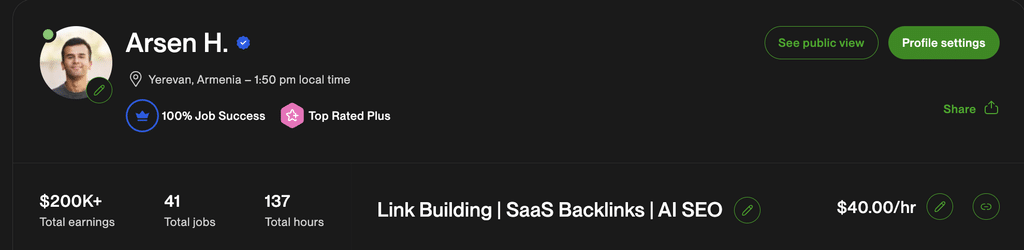
First of all a little background so you know where I am coming from. I’ve earned over $200K on Upwork with 41 jobs, 100% Job Success score, and Top Rated Plus badge. Out of those hours, only 137 were hourly, so the majority of that was fixed price link building projects. Fiver? I never used it. So I know Upwork inside and out and this is why I compared all the Fiverr numbers to Fiverr’s own help center and not just gut feeling.
Quick answer:
- Pick Upwork if you sell skills by the hour or by the project (dev, design, marketing, writing for businesses) and want bigger, longer client relationships. You keep 85% to 100% of each payment, but you pay to apply for jobs.
- Pick Fiverr if you can package your service into a clear product with a fixed price (a logo, a video edit, a product description pack). Clients come to you, but you keep only 80%, and you wait 14 days to get paid.
- Best move for most people: start on Upwork, add Fiverr once you’ve turned your service into a repeatable package. Nothing stops you from using both.
Want to skip straight to your own numbers? Our free freelancer fee calculators do the math for you. Otherwise, let’s get into the details.
Upwork vs Fiverr at a Glance (October 2026)
| Upwork | Fiverr | |
|---|---|---|
| How you get work | You send proposals to job posts (or clients invite you) | Clients find your gig and order it |
| Freelancer fee | 0% to 15% per contract | 20% on everything, tips included |
| Client fee | About 3% to 5%, plus a one-time $0.99 to $14.99 per contract | 5.5%, plus $3.50 on orders under $200 |
| Cost to apply | Connects, $0.15 each | Free |
| Pricing style | Hourly or fixed-price | Mostly fixed packages (hourly for projects of 8+ hours) |
| Minimum price | No set minimum ($5 minimum per fixed-price milestone) | $5 per gig |
| When you get paid | 5 days after a milestone is approved; hourly about 10 days after the week ends | 14 days after the order completes |
| Cheapest withdrawal | $0.99 local bank (free ACH for US tax addresses) | $0 to PayPal |
| Active clients | 763K (Q2 2026) | 2.68M active buyers (Q2 2026) |
| Spend per client | $5,230 a year | $368 a year |
| Best for | Ongoing, higher-budget client work | Productized services, quick one-off jobs |
That last pair of rows tells you a lot. Fiverr has about 3.5x more buyers, but the average Upwork client spends about 14x more per year. Different kinds of clients, different kinds of work.
How Each Platform Works (They’re Not the Same Thing)
Here’s the thing most people miss. Upwork and Fiverr aren’t two versions of the same marketplace. They work in opposite directions.
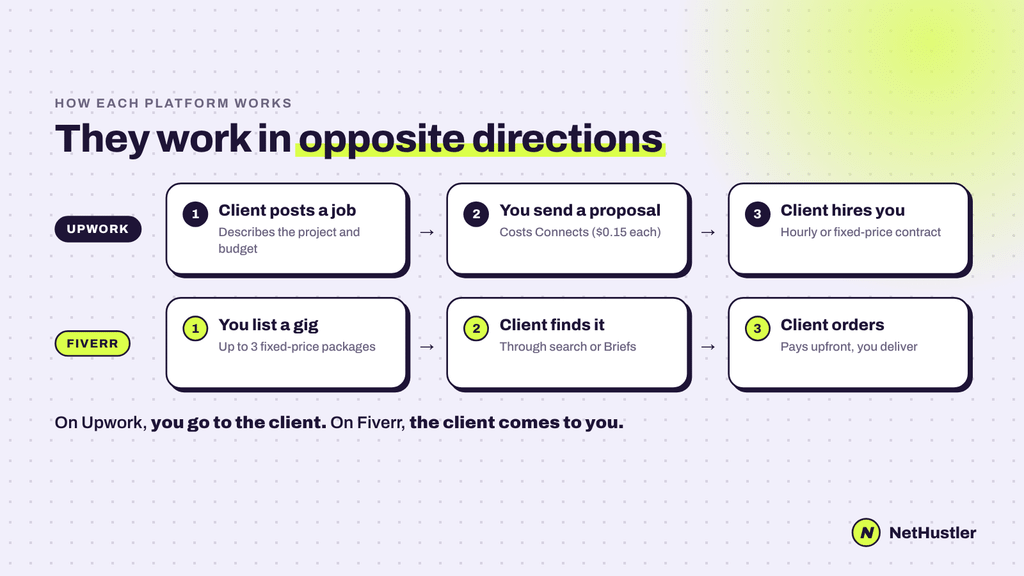
Upwork: you go to the client
A client posts a job. You read it, write a proposal and pay a few Connects to send it. The client picks someone, you agree on an hourly rate or fixed price, and you start.
You can also get invited to jobs, and Upwork still has its Project Catalog, where you list fixed-price packages Fiverr-style. But proposals are still how most work happens there.
Think of it like: job hunting, but for projects.
Fiverr: the client comes to you
You create a “gig” (a service with up to three price packages), and clients find it through search, order it and pay upfront. No proposals, no bidding.
There’s also Mira, Fiverr’s “AI headhunter,” which has fully replaced the old Briefs feature. A client describes the project, Mira writes the job description, reaches out to matching freelancers to check interest, availability and pricing, then hands the client a shortlist within 2, 4 or 12 hours. Fiverr says it looks for “talent with a track record of work like yours,” so it favors sellers with a proven history. Don’t count on it when you’re brand new.
Think of it like: opening a little online store where your service is the product.
Bottom line: on Upwork your hustle is writing proposals. On Fiverr your hustle is making your gig rank and convert. Pick the one that fits how you like to sell.
Upwork vs Fiverr Fees: What You Actually Keep
Fees are where most comparisons get lazy (or just wrong). So let’s do this properly, from both sides.
Upwork’s freelancer fee: 0% to 15%, and it changes per contract
Upwork’s fee history in one breath: 20/10/5% tiers until 2023, a flat 10% from May 2023, and since May 2025 a variable fee of 0% to 15%.
How is your rate picked? Upwork doesn’t publish the formula. It says the rate depends on contract type and supply and demand. In simple terms, you’ll probably see a lower fee where clients compete for freelancers, and a higher one where freelancers compete for clients.
The good news: you see your exact rate before you commit. It appears when you submit a proposal or receive an offer, and it’s locked in for that contract. So check it every time, and price your bid around it.
Two exceptions worth knowing:
- Direct Contracts (clients you bring to Upwork yourself) carry a reduced fee: 5% on the Basic plan, 0% on Freelancer Plus.
- Enterprise clients typically mean a 10% fee.
Fiverr’s seller fee: 20%, on everything
Fiverr is simple. You receive 80% of what the client pays. That includes tips. Yep, Fiverr takes 20% of your tips too.
No sliding scale. No discount for large orders or loyal clients. Twenty percent of both a $5 gig and a $5,000 project.
What you keep on a $100, $500 and $2,000 job
| Job price | Fiverr (20%) | Upwork at 15% | Upwork at 10% | Upwork at 5% |
|---|---|---|---|---|
| $100 | $80 | $85 | $90 | $95 |
| $500 | $400 | $425 | $450 | $475 |
| $2,000 | $1,600 | $1,700 | $1,800 | $1,900 |
Even at Upwork’s maximum 15% you still keep more than on Fiverr. On a $2000 project that’s $100+ more in your pocket.
Want to make a certain sum? Divide by one minus the fee. If you want to take home $100 on Fiverr, charge $125 ($100 / .80). Charge $111.12 on Upwork at 10%. Or skip the math and use our Upwork fee calculator and Fiverr fee calculator.
But wait: Upwork charges you to apply
This is the part that closes the gap. On Upwork, every proposal costs Connects, at $0.15 each. Upwork doesn’t publish a fixed price per proposal (it varies by job), and popular jobs cost more. Some Basic accounts get 10 free Connects a month; Freelancer Plus ($19.99/month) gets 100.
And you don’t get your Connects back if a client just picks somebody else.
Say you send out 15 proposals at about 10 Connects each before you get a client. That’s 150 Connects, or $22.50. Not a $2,000 project disaster. Pretty painful on a $100 one. Suggesting a proposal to the top of the list carries an additional cost.
There is no alternative to Fiverr. Gigs are free to list. (Fiverr Ads exist but are optional.)
What the client pays (this affects you too)
Clients compare total cost, not your sticker price. So client fees matter.
| Job price | Client pays on Fiverr | Client pays on Upwork (5%) |
|---|---|---|
| $100 | $109.00 | $105.00 + one-time $0.99 to $14.99 |
| $500 | $527.50 | $525.00 + one-time $0.99 to $14.99 |
| $2,000 | $2,110.00 | $2,100.00 + one-time $0.99 to $14.99 |
Fiverr charges clients 5.5% plus $3.50 on any order under $200. Upwork’s marketplace fee is about 3% to 5% on the Basic plan, plus a contract initiation fee of $0.99 to $14.99 per contract. Business Plus clients pay 10%.
Now add both sides for that $500 job. The client pays $527.50 on Fiverr and you get $400. That’s $127.50 (around a quarter of the job) going to the platform. If you do it via Upwork at 10% fee it would be around $75 on top of the one-time contract fee plus your connects.
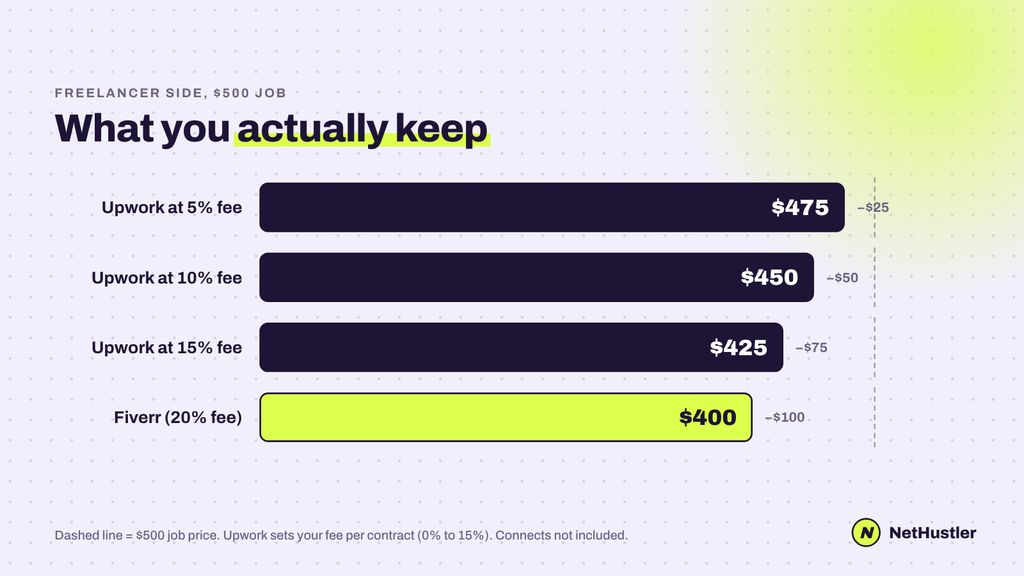
The bottom line on fees is that Upwork is cheaper for almost everyone, and the bigger the project, the bigger the gap. Fiverr is only worth it if you’d spend a lot of Connects to get small jobs.
Earnings: Which Platform Pays More?
Short answer: Upwork, for most skill sets. But not because there is some magical average.
Let me talk to you frankly. Neither platform reveals what their freelancers actually make. Those “average Fiverr seller makes $X” stats floating around? Fabricated or from microsurveys. Don’t make plans based on them.What we do have is client spending, straight from their latest earnings reports:
- Upwork: the average active client spent $5,230 over the last 12 months (Q2 2026, up 5%).
- Fiverr: the average buyer spent $368 a year (Q2 2026, up 15.6%).
That’s a big difference there. Fiverr buyers often come looking for one quick thing.
Typical rates
Upwork’s own hourly rate guide puts beginners at $10 to $25 an hour, intermediate freelancers at $25 to $60 and experts at $60 to $120+. Take it with a pinch of salt (it’s Upwork marketing), but it matches what you see on job posts.
Fiverr gigs start at $5, and that’s the problem. You’re competing in a store where the cheapest offer is right next to yours.
Do the hourly math on Fiverr gigs
This is where a lot of Fiverr sellers fool themselves. Say you sell a $200 package. You keep $160.
- Done in 4 hours? 40$ an hour. Alright.
- Two rounds of revisions and a needy client makes it 10 hours ? Now it’s $16 an hour.
Same gig, same price, very different company. Log your hours for the first 10 orders you take. Believe me.
What’s happening in 2026 (this matters)
Both platforms are going through a rough patch, and it’s worth knowing before you invest months in one.
- Fiverr lost a lot of small-job buyers to AI. Active buyers dropped 21.9% year over year to 2.68M. On its Q2 2026 call, management said orders in categories under $1,000 fell 10% or more, and writing and translation fell over 24%. Fiverr cut about 30% of its staff in September 2025 and is pushing toward bigger projects.
- Upwork is shrinking, but more slowly. Active clients fell 4% to 763K. It cut its staff by about 24% in May 2026. The good news, it says, is that work on AI is one of its fastest-growing categories.
What does it mean to you? The two platforms are pushing out cheap, simple gigs (basic writing, translation, simple logos) but it’s hardest on Fiverr. If your service is something artificial intelligence can do in 30 seconds, no platform is going to save you. Sell results, expertise and the things AI is unable to do yet.
I wrote more about this here: how to build a business that AI can’t kill.
Clients and Project Types: Who Hires Where
The client is the entire game. And the two platforms attract very different people.
Upwork’s clients are typically businesses with a defined project or an ongoing need. They post a job, compare proposals, interview and often continue working with the same freelancer for months. Most are on hourly contracts. Upwork also has a Business Plus and an enterprise arm, and its Business Plus volume grew 174% year-over-year in Q2 2026. Larger companies are using it more, not less.
Fiverr buyers tend to be more often solo founders, small shops, creators and marketers who want one specific thing done fast, at a price they can see upfront. They browse, compare gigs like products and hit “order”. Fiverr is trying to move up market but projects of $1,000+ are still only about 15% of order value.
Which platform fits your skill
| Type of work | Better fit | Why |
|---|---|---|
| Web and software development | Upwork | Big scopes, hourly work, long contracts |
| SEO, marketing, PPC management | Upwork | Ongoing retainers are common |
| Writing for businesses (blogs, B2B content) | Upwork | Recurring work, higher rates |
| Virtual assistance, admin, customer support | Upwork | Hourly, ongoing roles |
| Logo design, social media graphics | Fiverr | Easy to package and price |
| Video editing (shorts, reels, YouTube) | Fiverr | Clear deliverables, repeat buyers |
| Voice-over, music, audio | Fiverr | Classic gig format |
| Product descriptions, small writing packs | Fiverr (but squeezed by AI) | Small, fixed scopes |
| UX/UI and brand identity | Upwork | Needs discovery and back-and-forth |
This is a rule of thumb, not a law. Plenty of developers do well on Fiverr with packaged offers like “fix your WordPress bug” (see our list of the best Fiverr gigs). The test is simple: can a stranger understand and buy your service without talking to you first? If yes, Fiverr can work. If not, Upwork.
If you’re still figuring out what to sell, start with the digital marketing skills clients keep paying for.
Upwork vs Fiverr for Beginners: Where It’s Easier to Get Hired
Neither is easy. Anyone telling you otherwise is selling a course.
Starting on Upwork
The first client is the hard part. You compete against freelancers with 100 reviews and each proposal costs you connects.
What works:
- Apply to new job postings with few proposals quickly. You don’t have to be perfect but you do have to be in the top 5.
- Write about the problem in the proposal, not about your life story. The first two lines determine everything.
- Start with small. A $50 job with a 5-star review is better than waiting for the perfect $2,000 job.
- Get ID-verified early. Upwork may require verification and until this has been done you cannot send proposals or withdraw money.
Starting on Fiverr
The hard part is getting seen. New gigs sit at the bottom of search, and Fiverr’s ranking leans heavily on relevance, past client satisfaction, reviews and responsiveness. Which you don’t have yet.
What works:
- Niche down hard. “Logo design” is not good. ““Shopify pet store logos” can actually rank.
- Answer messages quickly. Your level is determined by response rate.
- Avoid cancellations. They hurt your success score, and plenty of sellers on the Fiverr forum report impressions dropping after one.
- Climb the levels. Here’s what Fiverr’s level system asks for:
| Level | Success score | Rating | Orders | Unique clients | Earnings |
|---|---|---|---|---|---|
| Level 1 | 5+ | 4.4+ | 5 | 3 | $400 |
| Level 2 | 7+ | 4.6+ | 20 | 10 | $2,000 |
| Top Rated | 9+ | 4.7+ | 40 | 20 | $10,000 |
Level 1 unlocks Seller Plus and makes buyers trust your gig more, so it’s worth hitting quickly.
So which is easier for beginners?
Fiverr is easier to start on (no proposals, free to list). Usually, Upwork pays you properly after you have a couple of reviews. If you are a total newbie with a zero portfolio, Fiverr is free to test demand. If you have skills and samples already, Upwork will get you to real money quicker.
Getting Paid: Timing, Withdrawal Fees and Protection
You did the work. Now how long until the money is really yours, and what does it cost to move it?
How fast you get paid
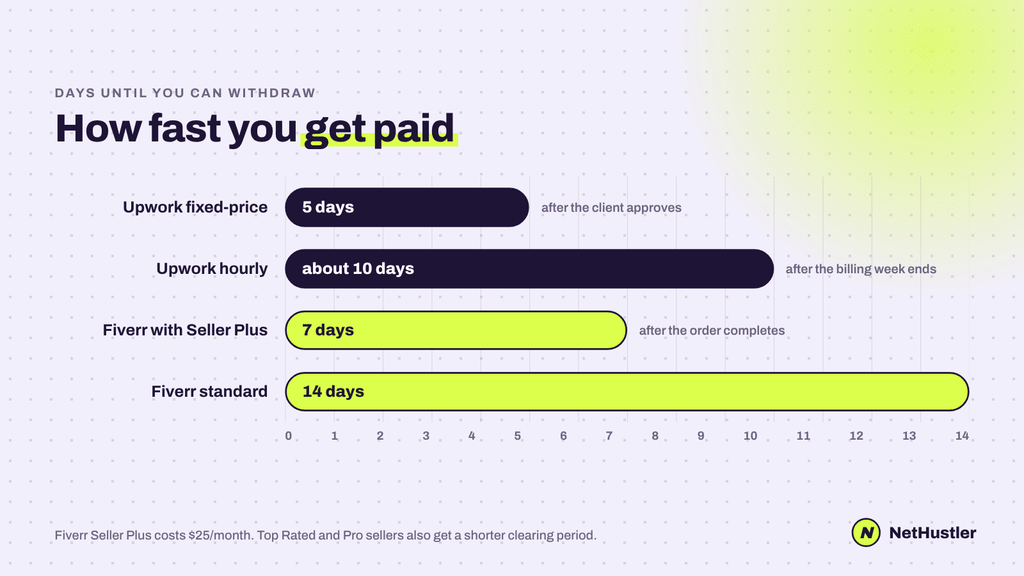
- Upwork fixed-price: money is released 5 days after the client approves a milestone. If the client goes silent, it auto-releases 14 days after you submit.
- Upwork hourly: hours are billed weekly (Monday to Sunday) and become available about 10 days later, on the following Wednesday.
- Fiverr: funds clear 14 days after the order is completed. Some programs like Top Rated and Fiverr Pro get a shorter clearing period, and Seller Plus ($25/month) cuts it to 7 days.
Upwork wins here. Two weeks of waiting on every Fiverr order adds up when you’re just starting.
Withdrawal fees
| Method | Upwork | Fiverr |
|---|---|---|
| PayPal | Small per-transfer fee (about $2) | $0 ($1 minimum) |
| Payoneer | Small per-transfer fee (about $2) | $3 ($10 minimum) |
| Local bank | $0.99 (Direct to Local Bank) | $1 via Payoneer ($20 minimum) |
| US bank (ACH) | Free with a US tax address; $2.99 with a non-US one | Through Payoneer |
| USD wire | $50 | Not offered |
Sources: Upwork payment methods, Upwork wire fees, Fiverr withdrawals.
No matter how you do it, withdrawal fees are small. What costs you is the currency conversion. If you’re not in the US, see what your bank or PayPal pays you per dollar and not just the flat fee. A poor exchange rate can stealthily take more than the platform’s withdrawal fee on every payout. If you also accept PayPal payments off-platform, our PayPal fee calculator includes the total cost with conversion.
Payment protection and disputes
Upwork:
- Fixed-price: the client funds the milestone before you start, so the money is already sitting in escrow.
- Hourly: you’re only protected if you log time with Upwork’s desktop app and the screenshots show real work. Manual time isn’t covered.
- Disputes: on fixed-price contracts, Upwork’s team mediates, and either side can go to paid arbitration if mediation fails.
Fiverr:
- Clients pay upfront for every order, so you never chase invoices.
- But clients can cancel without your approval if you miss a delivery date by 24 hours, and cancellations hurt your stats.
- Chargeback protection is at Fiverr’s “sole discretion“, so it’s not guaranteed.
Both platforms protect you way better than emailing some random client. To be honest, that’s half of what the fees pay for.
The Dark Side Neither Platform Advertises
I’ve made good money on Upwork. But that doesn’t mean it’s all rosy. Here’s what you should know before you jump head first into either one.
Upwork: fake jobs, Connects creep and a falling stock
Fake and “ghost” jobs. Some job postings aren’t real. Some are scams. Clients who try to get you onto Telegram or WhatsApp and ask for “deposits” or unpaid test work. Others are ghost posts where the client is just gathering ideas or prices quotes and never hires anyone. Upwork does fight this, and its scams FAQ is worth five minutes of your time. You only get your Connects back if Upwork removes the job for violating its policies. If a client just doesn’t hire, those Connects are history.
Red flags before you spend Connects. No verified payment method, $0 spent, zero hires, a vague AI-sounding description or any request to take the chat off Upwork.
Connects creep. Connects used to be about sending proposals. Now more and more features cost them:
- Boosted proposals: you bid extra Connects to get pinned at the top of the client’s list
- Availability badge: costs Connects every week it’s on (around 14 to 21 a week, depending on demand)
- ID verification badge: 35 Connects if you verify voluntarily
This isn’t a scam. But the direction is very clear: Upwork is finding new ways to charge freelancers for visibility. Plan for it, don’t just inflate every proposal because you can.
The business is under pressure. Upwork’s stock fell over 12% in one day after its Q2 2026 report, and was trading around $8 in August, down from a 52-week high of about $23. Layed off about 24% of staff in May 2026. Cut its full-year revenue forecast for a second time. Active clients are down 4%. CEO Hayden Brown blamed AI automation, a soft job market.
So why should you care, as a freelancer? A company under pressure to grow revenue tends to squeeze its users harder. Higher fees, more paid features and more Connects-hungry tools. That doesn’t mean Upwork is going away. Still has 763K active clients spending real money. Just don’t base your whole income on a single platform that you don’t own.
Fiverr: it’s not better on this front
Fiverr is in a rougher spot, honestly. Active buyers are down 21.9% in a year, revenue is shrinking, and it cut about 30% of its staff in 2025. On top of that:
- 20% of your tips go to Fiverr
- One cancelled order can tank your gig’s visibility, and clients can cancel on you if you’re 24 hours late
- Fiverr Ads and Seller Plus are its own version of “pay for visibility”
Bottom line: both platforms make money from you, and both are feeling the AI squeeze. Use them to find clients, then build things you own: a portfolio site, an email list, direct referrals. That’s how you stop being at the mercy of an algorithm or an earnings call.
Pros and Cons
Upwork
Pros
- Lower fees: 0% to 15%, and you see your rate before you commit
- Bigger clients and bigger budgets ($5,230 average yearly spend per client)
- Hourly contracts and long-term work are normal
- Faster payouts (5 days on fixed-price)
- Cheap local bank withdrawals in many countries
Cons
- You pay Connects to apply, and lose them if you’re not hired
- The fee formula is a black box
- Very competitive for newcomers, especially in popular categories
- Hourly protection only works with the time tracker running
- ID verification can block proposals and withdrawals until it’s done
Fiverr
Pros
- Free to list, no bidding
- Clients come to you and pay upfront
- Simple, predictable 20% fee
- $0 withdrawals to PayPal
- Great for productized, repeatable services
Cons
- 20% fee on everything, tips included
- Clients also pay 5.5% plus $3.50 under $200, which makes you look pricier
- 14-day wait before you can withdraw
- One cancellation can tank your visibility
- Small-order demand is shrinking fast (active buyers down 21.9% in a year)
Upwork or Fiverr: Which One Should You Choose?
Okay, decision time. Find yourself in this list.
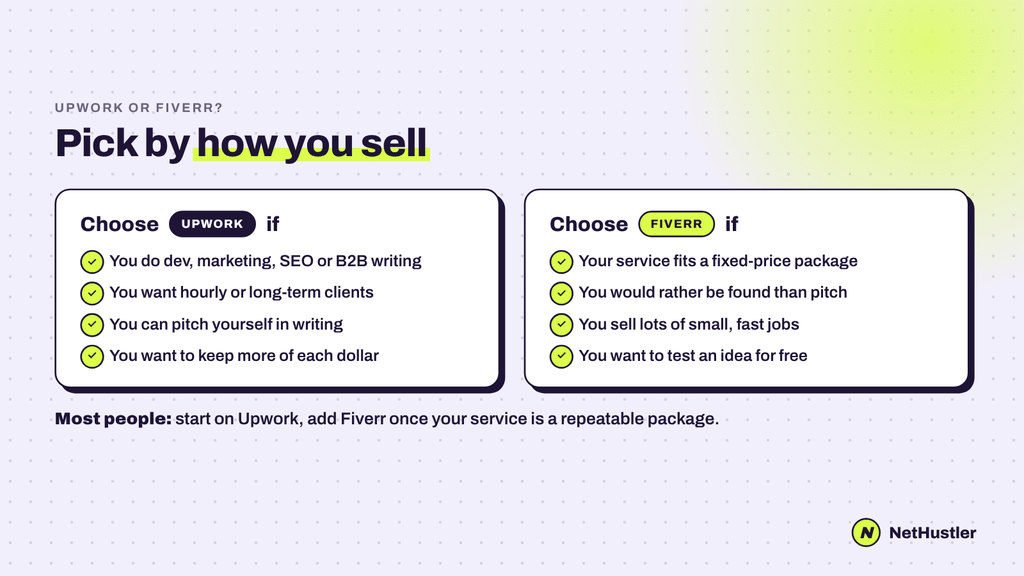
Choose Upwork if:
- You do dev, marketing, SEO, B2B writing, VA work or anything that requires back and forth
- You want hourly work or long term clients
- You’re good at selling yourself in writing (proposals are your sales pitch)
- You care about holding on to more of every dollar
Choose Fiverr if:
- Your service can be packaged with a clear deliverable and a price.
- You hate to pitch And would rather be found
- You do a lot of small, quick jobs (video edits, graphics, voice-overs)
- You want to try out a new service idea without paying to apply
Use both if:
- You have a productized offer and bigger custom work. Put the package on Fiverr and chase the big projects on Upwork. Plenty of freelancers run both, and neither platform asks you to be exclusive.
- Just don’t move a client you met on one platform off it to save fees. Both Upwork and Fiverr ban that, and it’s the fastest way to lose an account.
My verdict
For most freelancers in 2026, start with Upwork.
They pay less, clients pay a lot more, payouts are faster, and the work is often the kind AI is not replacing overnight. The cost of Connects is real, but it’s a small price to pay for access to clients spending in the thousands, not the hundreds.
Add Fiverr when you have turned what you do into a repeatable package that sells itself. This is where Fiverr’s ‘clients come to you’ model really shines.
And whatever you pick, know your numbers before you set a price. Run your rate through the Upwork or Fiverr fee calculator, and when you land a client outside the platforms, use our free invoice generator to bill them like a pro.
FAQ
Is Upwork or Fiverr better for beginners?
Getting started with Fiverr is easier because listing a gig is free and you don’t write proposals. Upwork is usually better for earning real money sooner if you already have skills and a few work samples, because clients spend far more there ($5,230 a year on average vs $368 on Fiverr).
Which pays more, Upwork or Fiverr?
Upwork, for most of the freelancers. It charges 0% to 15% compared to Fiverr’s flat 20%, so on a $500 job you keep $425 to $500 on Upwork and $400 on Fiverr. Upwork clients also tend to have bigger budgets. Your real number is what you spend on Connects, take it off.
How much does Upwork take from freelancers in 2026?
Upwork will charge freelancers a fee between 0% and 15% per contract, starting May 2025. You see the exact rate when you submit a proposal or get an offer, and it locks in for that contract. Direct contracts with clients you bring get a lower fee.
How much does Fiverr take from sellers?
Fiverr takes 20% of every order, including tips and extras, so you get 80%. Buyers will pay a separate service fee of 5.5% + $3.50 on orders under $200.
Can you use Upwork and Fiverr at the same time?
Yes . There are lots of freelancers who use both, and neither site requires you to be exclusive. But don’t take a client you met on one platform and move them off it to avoid fees, as both Upwork and Fiverr prohibit that.
How long does it take to get paid on Fiverr vs Upwork?
Fiverr pays out earnings 14 days after an order is marked complete (7 days with Seller Plus). Upwork releases fixed-price payments 5 days after the client approves the work, and hourly earnings approximately 10 days after the billing week ends.
Do you have to pay to apply for jobs on Upwork?
Yes. Proposals cost Connects 15 cents each. The number you need depends on the job. Basic accounts get 10 free Connects a month; Freelancer Plus ($19.99/month) includes 100.
Is Fiverr still worth it in 2026?
Yes, for productized services that are not easily replaceable by AI. Demand for small and simple jobs is falling, with Fiverr’s active buyers down 21.9% year over year by Q2 2026, with writing and translation hit the hardest. Larger, more specialized packages are doing better.
Stay hustlin’.