
Free Invoice Generator for Freelancers and Online Sellers
Type straight onto the invoice and download a clean PDF. No signup, no watermark, no limits. Price it so the PayPal or Stripe fee doesn't come out of your pocket, and a $500 job lands as $500.
Welcome back
Click anything on the invoice to change it. Totals update as you type.
Saved in this browser only. Use ⋯ → Back up everything before clearing browser data or switching devices.
These would make the invoice look unfinished to your client.
Three things that get you paid faster.
- Send it with a short messageWritten for you. Attach the PDF.
- Get a nudge on the due dateAdds a calendar reminder with a link back here.
The Secret Newsletter sends one practical way to earn more online each week. Free, and you can unsubscribe in one click.
Your invoices stay in this browser. Bookmark the page so you can find them again.
This free invoice generator makes invoices, quotes, proforma invoices, receipts and credit notes as PDF. Pick one of three templates, add your logo, bill in any of 50+ currencies and seven languages, and print a payment link or a scan-to-pay code. No signup, no watermark, no limits: nothing is uploaded, everything stays in your browser.
How to make an invoice in 5 steps
- Add your details once. Name, logo, address, tax ID and how you get paid are saved in your browser, so the next invoice starts filled in.
- Pick the client. Saved clients fill in with one click.
- List the work. Hours, days, words, items or a fixed price. Expenses can be marked tax-free.
- Set tax and terms. Up to two taxes, a discount, a deposit, Net 7 to Net 60 and an optional late fee. Cross-border B2B work gets the reverse-charge wording.
- Download the PDF. One click saves it to your downloads, with no print window. The text in the PDF is searchable and can be copied, the table header repeats on every page and no line is split in half.
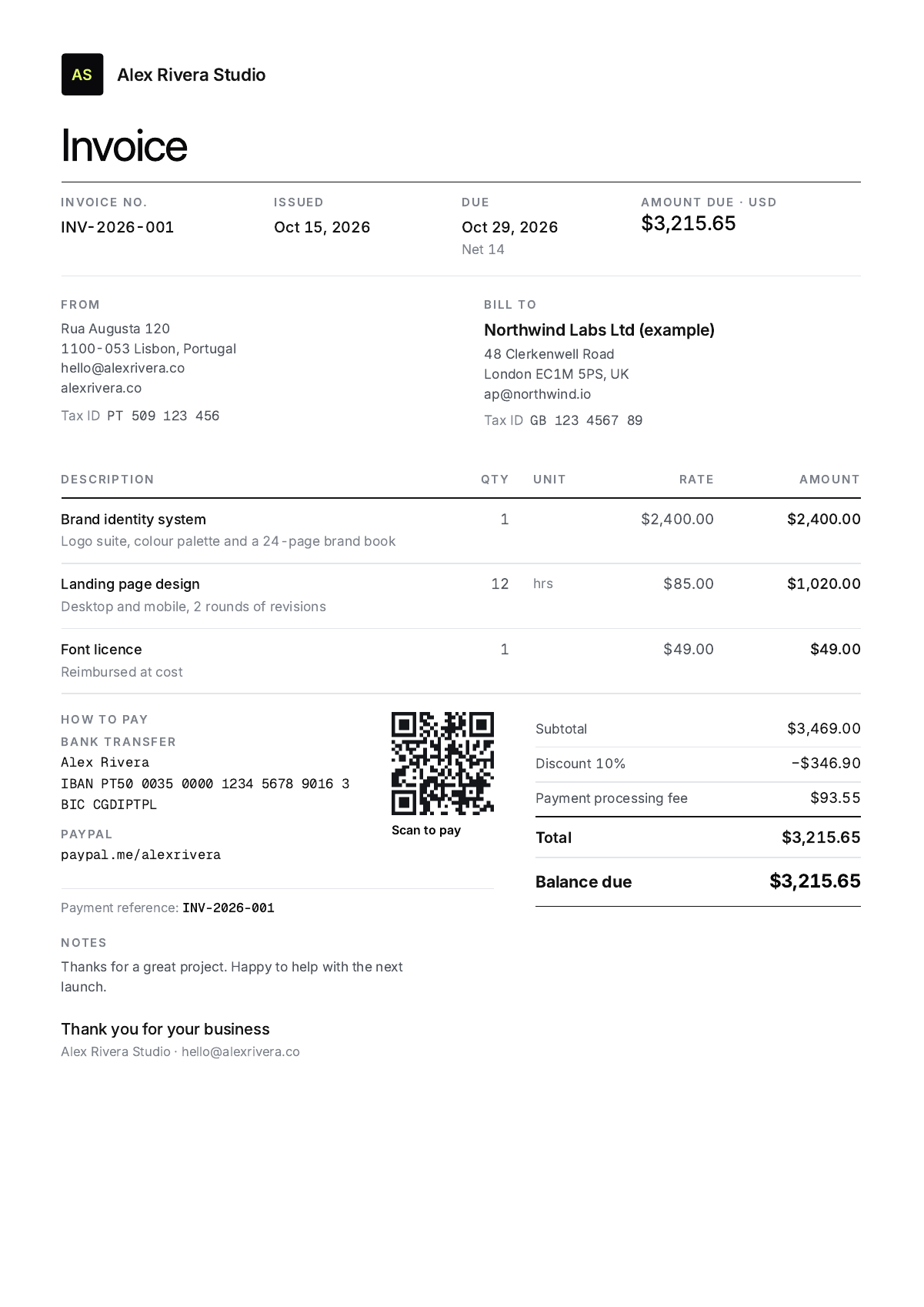
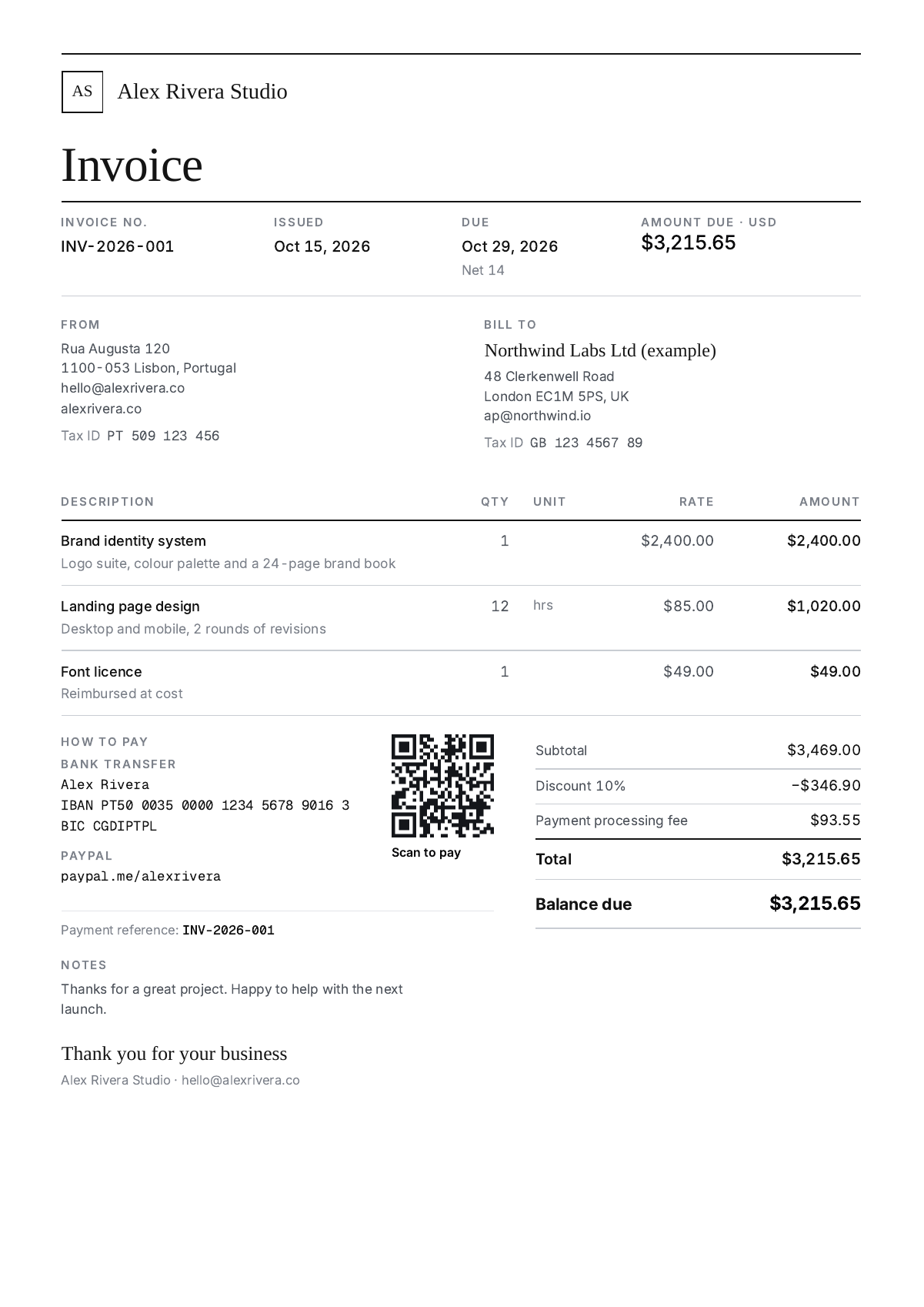
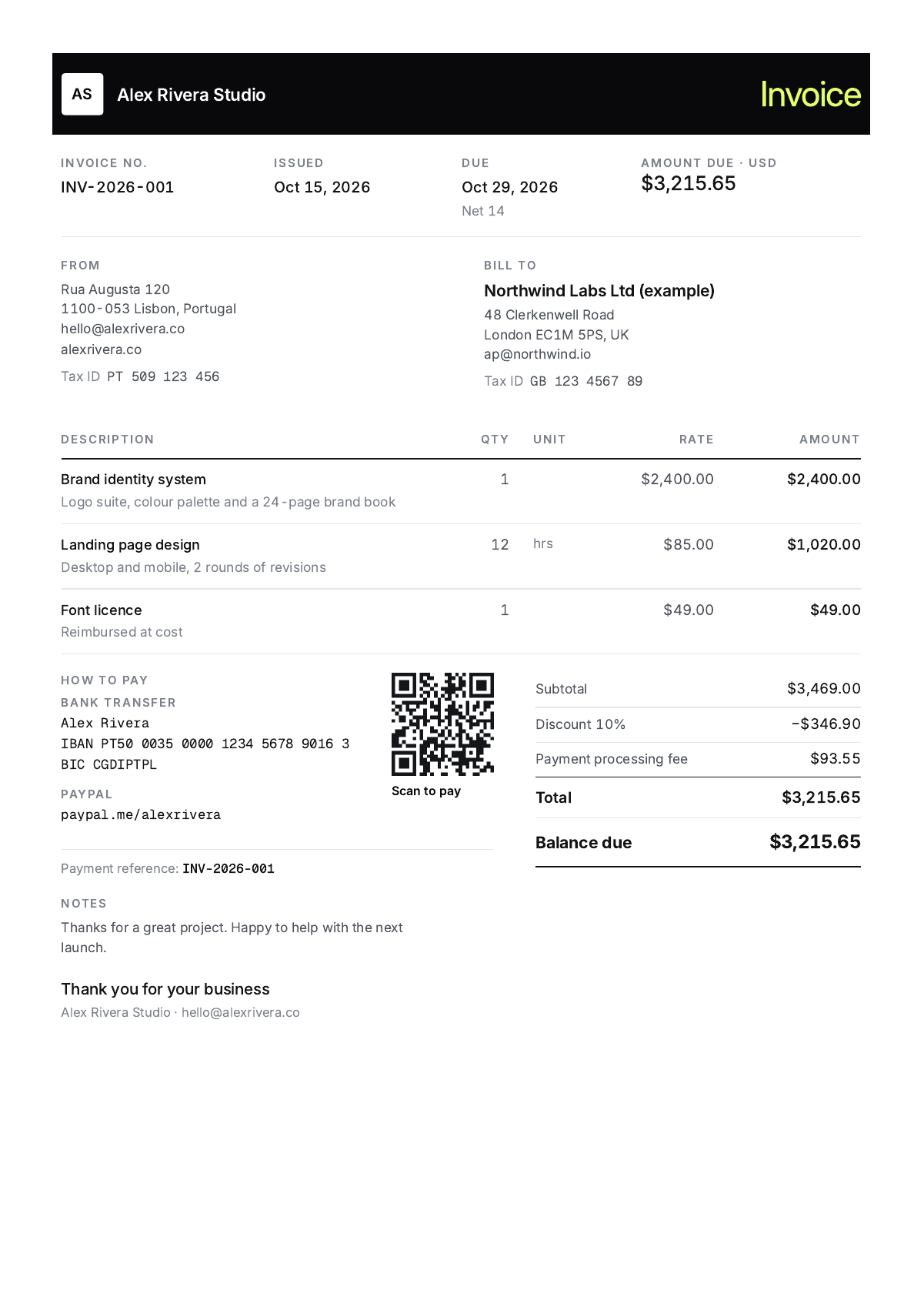
Three free invoice templates
Every template prints on one A4 or US Letter page with real, selectable text. Switch between them at any time; your details stay put.
Which document do I send?
| Document | Send it when | Counts for tax? | In this tool |
|---|---|---|---|
| Quote | Before the work, to agree the price and scope. | No | Once accepted, it becomes the invoice with one click and gets an invoice number. |
| Proforma invoice | The client needs a bill before you deliver: a prepayment, customs, or their internal approval. | No, it is not a tax invoice | Same layout, marked proforma. Turn it into the invoice when you deliver. |
| Invoice | The work is delivered or a milestone is reached. | Yes | Numbered in sequence and tracked as unpaid, paid or overdue in My invoices. |
| Receipt | The client has paid and wants proof. | It records the payment | Mark the invoice paid; the receipt is one click away. |
| Credit note | An invoice was wrong, or you are refunding part of it. | Yes, it cancels or reduces an invoice | Made from the invoice with its own CN number. Never edit a sent invoice; credit it and reissue. |
What to put on a freelance invoice so it gets paid
- A unique, sequential invoice number and the issue date
- Your name or business, address and tax ID (VAT, GST, ABN or EIN where you have one)
- The client's legal name and address, plus their VAT number for EU B2B work
- Clear line items with quantity, rate and amount
- Tax shown separately, or the reason no tax is charged (reverse charge, export of services, not registered)
- A due date, not just "Net 30", and any late fee terms
- Exactly how to pay, and the reference the client should use
How to number invoices
Use one sequence per year and never reuse or skip a number: INV-2026-001, INV-2026-002 and so on. Tax offices in the UK and the EU expect invoice numbers to run in order, and a gap looks like a deleted invoice. Your first invoice can be 001; nobody expects you to start at 1047. Quotes, proforma invoices, receipts and credit notes get their own sequences (QUO, PRO, RCT, CN) so the invoice run stays unbroken. The generator counts up for you, keeps a counter per type and year, and lets you pick the format or add your own prefix under Region → Invoice numbers.
Payment terms: Net 7, 14 or 30?
Net 14 is a sensible default for a new client: long enough to clear their payment run, short enough that you notice a problem early. Use "Due on receipt" for small jobs and for anyone who has paid late before. On projects longer than a couple of weeks, invoice a deposit of 30 to 50% up front and the rest on delivery; the final invoice has a "Deposit paid" line for that. Retainers are billed on the 1st of the month, in advance. Whatever you choose, print the actual date ("Due 28 October 2026"), because the date is what gets typed into their accounting system.
Late fees clients accept
A late fee is a deterrent more than an income line, and it only works if it was on the quote and the invoice before the work started. The usual rate in the US is 1.5% per month (18% a year); some states cap it lower. In the UK, business clients owe statutory interest at 8% above the Bank of England base rate plus fixed compensation of £40 to £100 per invoice, whether or not you printed it. In the EU the Late Payment Directive sets a similar rate (the ECB rate plus 8 points) for business-to-business work. Pick the late fee once and the wording prints on every invoice.
Getting paid by PayPal, Stripe or card without losing the fee
A $500 invoice paid through PayPal in the US arrives as about $482: 3.49% plus $0.49 goes to PayPal. Adding $17.94 to the invoice does not fix it, because PayPal takes a cut of the extra too. The generator grosses the amount up so that what lands in your account is what you quoted: for $500 that is $518.59. Pick the processor under "Who pays the fee?" and the invoice gets a payment processing line; the panel shows what you keep either way. Those are US rates checked 14 October 2026; the PayPal fee calculator has other countries and international payments.
Before you add that line, the rules as of 14 October 2026:
- PayPal. PayPal's US user agreement says you will not add a surcharge for paying with PayPal. A line called "PayPal fee" breaches it. The same applies in most countries where PayPal operates.
- Cards. Surcharges on consumer cards are banned in the UK and the EU and are being removed in Australia. In the US about ten states ban or cap them, and Visa and Mastercard cap them at 3% with advance notice. Commercial cards and business clients are generally allowed, but check the contract.
- Bank transfer, Wise, crypto. No surcharge rules apply, and there is usually no fee to pass on.
The approach that works everywhere: quote the grossed-up amount as the price, keep the processing line neutral, and offer a discount for paying by bank transfer or Wise. The fee panel has a button for that; it adds "Pay by bank transfer by the due date and deduct $18.59" to the notes, in the invoice language. The client picks convenience or the discount, and nobody has been surcharged.
Invoicing clients abroad
Invoice in the currency you agreed with the client; 52 currencies are built in, including USDT, USDC and BTC. If you also want the total in your own currency, set a second currency and a rate under Region and the invoice prints the equivalent and the rate used, so both sides see the same number. Services sold to a VAT-registered business in another EU country, or between the UK and the EU, are usually reverse charged: you don't add VAT, you print both VAT numbers and the reverse-charge statement, which the Tax tab does for you. Services to clients outside the EU and the UK are normally outside the scope of VAT; the "export of services" wording covers that. For the payment, print your IBAN and BIC for SEPA transfers, or your Wise or Payoneer details, and ask for the invoice number as the reference so the money can be matched. The invoice itself can be in English, Spanish, French, German, Portuguese, Italian or Dutch: the labels and the legal wording switch, your own text stays as typed.
Sending the invoice and chasing it
Attach the PDF to a short email: what it is for, how much, when it is due and how to pay. The generator writes that email for you (⋯ → Open in email app, or Copy email text), with the amount, the due date and the payment link filled in. If it isn't paid:
- On the due date: a friendly nudge, in case it is already on its way.
- A week later: ask when to expect it and attach the invoice again. Most late invoices were simply never entered.
- Two weeks later: state how many days overdue it is, that the late fee in the terms applies, and ask them to tell you if anything on the invoice is wrong.
My invoices writes those three reminders for you in that order, and the wording firms up on its own as the days pass. If you got the amount wrong, don't edit the sent invoice: issue a credit note for the difference and a new invoice, so both stay in your records with their own numbers.
Free invoice generators compared
Before building this one we read the pricing pages, app-store reviews and support forums of ten free invoice generators (sources below). Two complaints came up far more than any other: a "free" tool that asks for money or an account at the download step, and invoices that vanished because a save failed or the plan changed. This generator has no account to lose and keeps everything on your device, with a one-click backup file.
| Tool | Signup | Watermark | Free limits | Where your data lives | Pass on the PayPal / Stripe fee |
|---|---|---|---|---|---|
| NetHustler (this tool) | None | None | Unlimited | Your browser only | Yes, with what-you-receive maths |
| Invoice-Generator.com | Optional | None | Free; account for saving and sending | Their servers once you sign up | No |
| Invoice Simple | To save or send | Branding on the free generator | Paid plans cap invoices: 3 or 10 a month on the lower tiers | Their servers | No |
| Invoice Home | Required | Yes, on the free plan | Free up to $1,000 invoiced per 30 days | Their servers | No |
| Refrens | Required to save | Refrens branding | 15 documents on the free plan | Their servers | No |
| Zoho Invoice | Required | None | Free; yearly invoice cap (see zoho.com) | Their servers | No (requested by users) |
| Wave | Required (free generator is US only) | None | Invoicing free; bank feeds and extra users moved to Pro in June 2026 | Their servers | No |
| PayPal invoicing | PayPal account | PayPal branding | No plan fee; 3.49% + $0.49 per payment (US) | PayPal | No |
| SumUp Invoices (UK) | Required | None | Free plan is GBP and one language only | Their servers | No |
| Canva / Word / Google Docs templates | Account | Pro elements on free Canva | No automatic totals or numbering | Their cloud or your files | No |
Sources
- Fee presets: PayPal merchant fees, Stripe pricing, Square pricing. US rates, checked 14 October 2026.
- Surcharge rules: PayPal US User Agreement ("No surcharges"), the UK Consumer Rights (Payment Surcharges) Regulations 2012, EU PSD2 article 62, and Stripe's surcharging guide for US states and card-network caps. Checked 14 October 2026.
- Competitor rows: each tool's pricing or plans page and its reviews on the Apple App Store, Google Play, Trustpilot, Capterra and G2, read in October 2026. Plans change often; check the provider before relying on a detail.
- Complaints: public threads in r/freelance and r/smallbusiness, the Zoho, Invoice Ninja and InvoicePlane forums, and the Upwork and Fiverr community forums, 2024 to 2026.
Questions freelancers ask
Is this invoice generator really free?
Yes. No account, no watermark, no limit on invoices, and the logo upload is free too. Everything runs in your browser.
Where is my data stored?
Only in your browser's local storage on this device. Nothing you type is sent to our servers. If you clear your browser data or switch devices, use ⋯ → Back up everything first and restore the file later.
How do I download the invoice as a PDF?
Click Download PDF. The file goes straight to your Downloads folder, named after the invoice number and the client. On iPhone and iPad, Safari asks whether to download it; the file is then in Files, under Downloads. The text in the PDF can be searched and copied, and payment links stay clickable. To print on paper, use Print in the ⋯ menu.
What should my first invoice number be?
001 in the format you chose, for example INV-2026-001. Clients don't care that it is your first; tax offices care that the sequence has no gaps. Add your initials as a prefix under Region → Invoice numbers if you like.
Can I send an invoice without a registered business or tax ID?
In most countries, yes: a sole trader can invoice under their own name and address, and the tax ID line can stay empty. Don't add VAT or sales tax you are not registered to charge; choose "Not VAT registered" under Tax and the invoice prints the right wording. Some countries require a tax number before you trade at all (Germany and Spain, for example), so check your local rules.
Are these invoices valid for tax purposes?
Yes, if they carry what your tax authority asks for: a sequential number, the date, both parties, a description, the amounts and the tax treatment. The templates include all of those. A PDF is accepted almost everywhere; a few countries also require invoices to go through a government e-invoicing system (Italy for most businesses, India above a turnover threshold), which no browser tool replaces.
Can I make quotes and receipts too?
Yes. Switch the document type to Quote, Proforma, Receipt or Credit note. A saved quote can become an invoice in one click, and a paid invoice can become a receipt.
I sent an invoice with the wrong amount. What now?
Don't edit it. Open it in My invoices, switch the type to Credit note for the wrong amount (or the difference), and send that with a corrected invoice. The credit note gets its own CN number and the original stays in your records.
What is the reverse charge and when do I need it?
When you sell services to a VAT-registered business in another EU country (or between the UK and EU), you usually don't charge VAT. The client accounts for it instead. The invoice must show both VAT numbers and a reverse-charge statement, which this tool adds for you. Check with an accountant if you're unsure.
I invoice in one currency and get paid in another. How do I record it?
Invoice in the currency you agreed and let the bank or Wise convert. The second-currency line on the invoice shows the equivalent and the rate, so both sides see the same number. Record what actually landed in your account as the paid amount.
Can I invoice in crypto?
Yes. Choose USDT, USDC or BTC as the currency, or keep your normal currency and add a crypto address under Getting paid. Always write the network (for example TRC-20 or Base), because coins sent on the wrong network can be lost.
My client isn't paying. What can I do?
Send the three reminders from My invoices, then a final notice with a date. Business clients in the UK and the EU owe statutory late-payment interest even if the invoice didn't mention it. After that it is a letter before action and the small-claims route. Keep the invoice as issued; a credit note is not the answer to non-payment.
How long should I keep invoices?
Usually five to ten years, depending on the country: HMRC asks for six years (five for the self-employed), the IRS for at least three, most EU countries for seven to ten. Use ⋯ → Back up everything now and then and keep the file with your PDFs.
Should I invoice clients I found on Fiverr or Upwork?
Not for work that started on the platform. Taking payment outside it breaks both sites' terms and can get your account banned. Use this generator for direct clients, repeat clients you met elsewhere, and your own website. For platform work, see what Fiverr's 20% leaves you and the Upwork fee calculator.
Can my client pay with a card?
Paste a Stripe, PayPal, Square or Wise payment link into "Payment link" under Getting paid. The invoice shows a clickable Pay online link and a QR code the client can scan.
