
Difference Between Popup, Popunder & Interstitial Ads

First of all, before we get into the differences between popup and popunder ads, I just want to let you know that I wasted at least 1 hour before writing this article thinking of the correct usage of the words: popup, popunder vs pop-up, pop-under…
I have no clue which one is the correct choice, so I think I’m going to use all the damn versions… oh I forgot there’s also the space in-between like: pop-up and pop-under…
There are already enough confusing performance marketing terms such as CPA vs CPS, and CPM, CPC, CPL, CPI, CPV…. the list goes on and on.
How come nobody regulated this shit and said look, we call it pop-ups and pop-unders. That’s it.
Anyway… sorry for the little rant lol, but you tell me the correct version in the comments down below, and I’ll calm down, deal?
Now that we got that out of the way, let’s continue with our article shall we?
Right…
What is Pop Traffic?
Pop traffic refers to website visits generated by a pop ad. It refers to all users who interact with pop ads on websites and apps.
For instance, when someone comes to your house, they become a visitor. Likewise, when users click on a pop ad and land on your page, they become pop traffic.
Different scenarios, but the same thing. Technically.
Now, we can start with the grandaddy, the pop-up.
What is a popup?
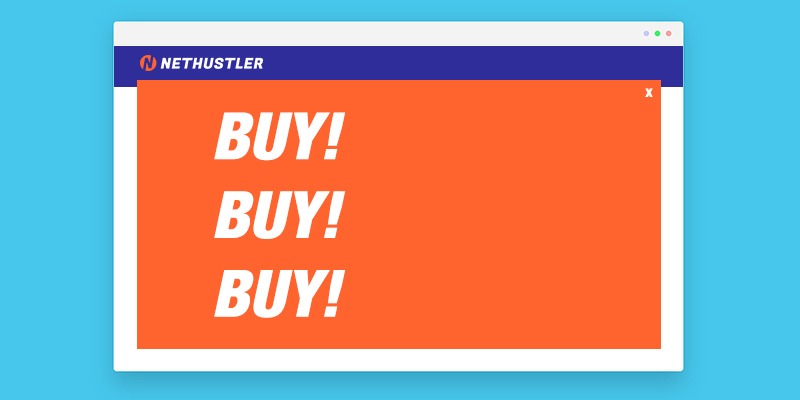
A popup is a type of pop ad that appears on the page a user is viewing. The pop-up ad opens in a new browser window and appears on top of the page content, forcing the viewer to see it. It appears immediately when users interact with your site.
It’s a type of advertising marketers use when they quickly want to capture attention. But since they appear without warning and interrupt browsing, many users find them annoying. Research shows that intrusive popups increase irritation and fatigue, and decrease browsing satisfaction.
Many browsers close the new tab immediately without reading a single line of text. In fact, many go so far as to install ad blockers to keep them away. Research shows that 29.5% of internet users use ad blockers.
Still, pop-up ads can be very effective when used well. Using ad text or an image that grabs attention with a killer offer makes conversions easier.
Affiliates doing CPA marketing will likely see good results promoting sweepstakes offers with pop-up ads.
Moving on…
What is a popunder?
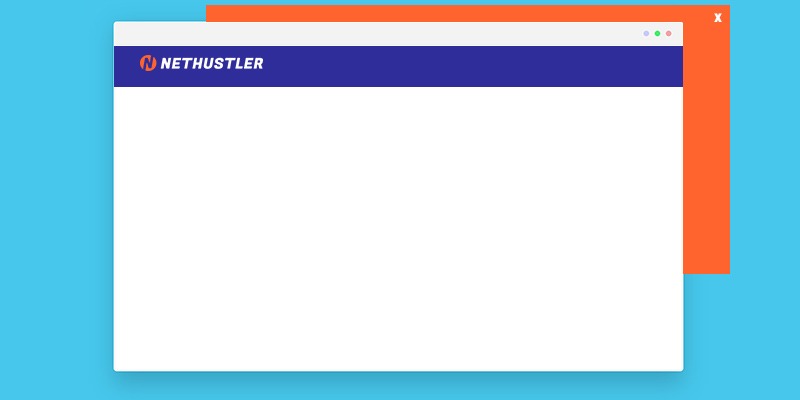
A popunder is another type of pop advertisement that displays while someone browses your site. It’s similar to a pop-up, only it opens in a new browser window beneath the actual content.
This background style makes popunder ads less intrusive and disruptive than popups. And many advertisers have been favoring them over pop-up traffic in recent years.
Since popunders display underneath the website a user is viewing, the user usually sees the ad after closing the page. Or when closing their browser tab.
This scenario makes users more likely to interact with this ad format than with popups, which many people close immediately. It’s because they have no idea when or how the popunder or new tab appeared.
Consequently, advertisers are more likely to achieve better results with popunder ads than with pop-ups.
What’s the difference between a popup and a popunder?
The difference between pop up vs pop under ads lies in their display styles and how users interact with them.
Display Style
Popups appear on top of the content that a user is viewing. Popunder ads open underneath the content in a separate browser tab.
Visibility
Popups have higher visibility because users are forced to see them as they pop up over the content they’re viewing. On the other hand, popunders have delayed visibility, as users might not see it for several minutes or even hours. Some users even close all tabs at once without seeing the popunder ad.
Interaction
Many users find popups intrusive and often close them immediately without reading the ad.
However, users often interact more with popunders since they appear without disrupting their current action. You’re more likely to read the content you find waiting for you than the one that interrupts you rudely. Just like it happens with humans; it’s psychology, nothing more.
What is an interstitial advert?
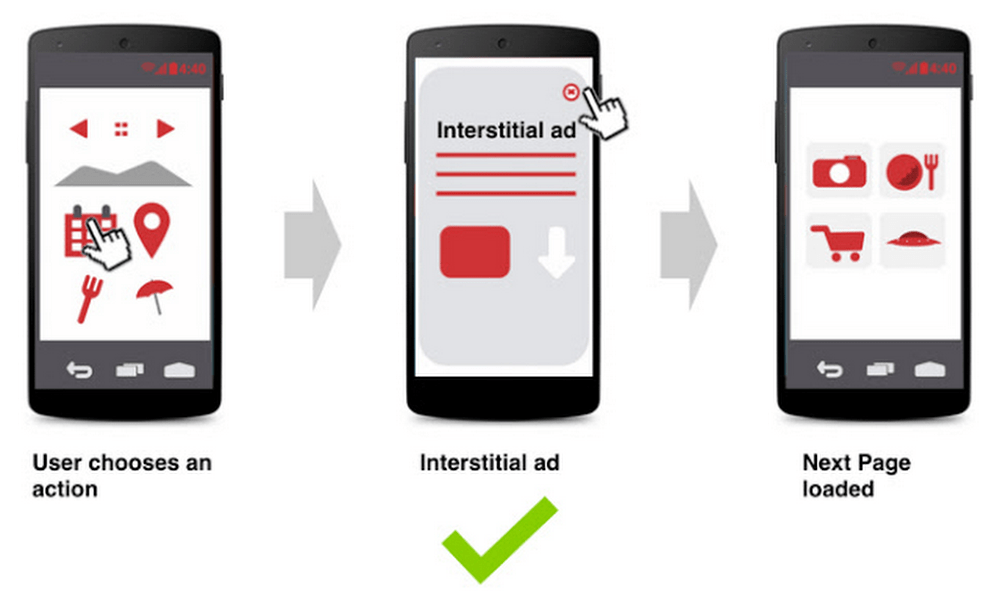
An interstitial advert is a full-screen display over your content on your site or app. It’s similar to a pop-up ad, but it doesn’t open in a new browser window. Instead, it covers all (or part) of the page content from top to bottom.
While almost as annoying as original popup ads, interstitials are a mix of traditional banner ads and pop ads. And since they don’t open in a new browser window altogether, users will generally engage more with them.
The CTR (Click-Through Rate) on interstitial ads is one of the highest that you can get on any banner ad. It’s not unusual to see an ad CTR of 5% on Android. But banners and display ads have average CTRs of 1% or lower.
Popular companies such as Uber use interstitial ads, especially on mobile.
The benefits of popup and popunder ads
Benefits of Popup Ads
Below are the benefits of Popup Ads:
- They’re cheap: Popup traffic is cheap as heck, costing less than banner or push ads. Plus, they have higher CTRs than traditional display ads like banners. Research shows that 80% internet users have developed banner blindness.
- High visibility: Since they’re a bit more intrusive and disruptive, there’s no chance users will miss your ad. And if you can come up with a great offer, you will have more success running pop ad traffic than regular ads.
- Flexibility: Popups work well on desktop and mobile screens. In addition, various user actions, such as scrolling, clicking, or exit intent, can trigger them. Advertisers can also target users based on their location, browser, or even browsing time.
- Fast testing: Popups offer a fast way to test promotions. They’re easy to launch and can generate high traffic and responses.
There are tons of big companies that have used pop-up advertising to send traffic to their businesses, such as Orbitz. So yeah, pop advertising can be effective.
Also, have you noticed an increase in on-site popups?
You know, the annoying cookie consent ones, or the ones asking you to sign up to their email list?
Well, that happens because webmasters have realized that popups are effective, despite our hate for them. Even though they’re disruptive, they work.
Otherwise, you wouldn’t see millions of websites using them. Including big ones like Amazon and Facebook.
They all use some sort of on-site pop-up to let you know about some new rules or to see hot deals, etc. They know very well that they are annoying, but since they are effective, hey… they’re going to use them.
The drawbacks of pop ads
There are a ton of cons and drawbacks to pop ads.
The big one: It’s mostly junk traffic, or low quality at best. You need a good pop ad network. You must also target and exclude zones and websites that send bot traffic.
Drawbacks of Popup Ads
Below are the disadvantages of popup ads:
- Highly intrusive: Since they interrupt browsing, many users find them annoying. Sometimes they’re scams, poorly designed, or contain malware. All of those combined, and it makes sense why some internet users install ad blockers. Browsers such as Chrome have built-in ad blockers that block annoying ads.
- High bounce rate: Many users close pop-ups without reading the advert. They were not expecting it, so why not?
- Damage brand reputation: Too many disruptive ads will frustrate users and make them even more likely to suspect your site is a scam.
- Slow down site: Using heavy elements like video and high-resolution graphics can slow your site, harming the user experience.
Drawbacks of Popunder Ads
Below are the disadvantages of popunder ads:
- Delayed Visibility or No Visibility: Because your ad appears behind users’ content, they might not see it for several minutes or even hours. Also, users might close all tabs after browsing, which means they won’t see it.
- Not good for urgent offers: Since popunders don’t demand immediate attention, they may not perform well with time-sensitive offers.
- Mobile limitations: It’s difficult to notice background tabs opening on mobile devices. Thus, popunders convert less on phones and tablets.
Nevertheless, for advertisers, there are many benefits to using pop advertising. Do it the right way, don’t promote scams, malware, and shady shit. And it’ll work in your favor.
Pop Ads Networks
There are many pop ad networks from which you can purchase pop traffic, including pop-up, pop-under, and interstitial ads.
The one that I have the most experience with is PopAds.net. Quality isn’t great, but you can always test some stuff.
Sure, they have bot traffic on it too, but show me a pop ad network that doesn’t have any fake traffic, and I will gladly try it out and let you know.
There are more pop ad networks besides PopAds.net, such as:
These popup and popunder ad networks are good for both advertisers and publishers. They’re good alternatives to Google AdSense.
But like I’ve said, you will find bot or fake traffic on pretty much any ad network, including PopAds. Track everything and optimize on the go (cut bot traffic sources/websites).
How do Pop Ad Networks Work?
Pop ad networks connect advertisers with websites who published ads.
On pretty much any type of pop ad platform, you will encounter certain terms when creating a pop ad campaign. They include: CPV, CPM, Frequency cap, ad-block traffic, sources, and targets.
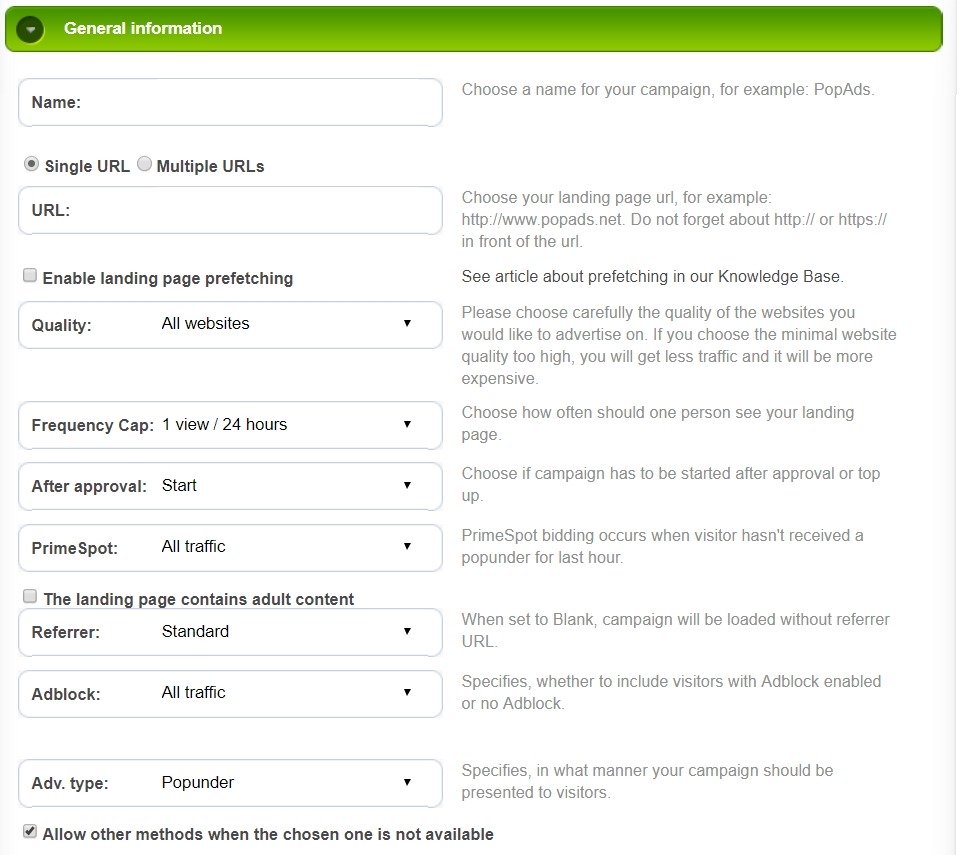
I’m going to give you a short explanation for some of these here so that you can be better prepared when you decide to try out your first pop ad campaigns.
Bidding: CPM / CPV
The pricing model for pop ads is based on CPM or CPV, depending on the network that you’ve joined. On PopAds.net, it’s CPV.
CPM stands for cost per mille, and it means how much you’re paying for 1,000 impressions.
CPV stands for cost per view. With this pricing model, you’re paying for every view.
So if you’re bidding $1 on a CPM model, you’ll pay $1 for every 1,000 impressions your popup or popunder ad receives.
If you’re bidding $0.01 per CPV, you’re basically paying 1 cent per view.
Don’t make the mistake that I once did and bid $2 for CPV, because oh boy, you’re going to be in a lot of trouble. I lost $300 or so in a few minutes, thinking I was bidding on a CPM rate, but I was bidding on a CPV rate. Lol.
Learn more about CPC, CPM, CPV, eCPV, CPI, so you don’t make costly mistakes like I did.
Frequency Cap
The frequency cap is the number of times a unique user sees your ad in 24 hours. It’s a pretty important aspect of pop advertising that limits how many times your ad appears to the same person.
So if you set your frequency cap to 1 view per 24 hours, a unique visitor will only see your pop ads once a day.
If you want more traffic, you could raise your frequency cap. 3 views in 24 hours means 3 times a day.
You can play with this feature as you want. Some advertisers usually choose a lower number. But then again, it also depends on what kind of product, service, or offer you are promoting.
Ad-block Traffic
Some pop ad networks can still display popups even when a user use adblock software like uBlock Origin.
They do so by running the script before the blocker reacts, using redirect links and anti-ad blockers, and in several other ways.
It’s up to you to decide whether to include and target the traffic in your campaign.
Some advertisers think that because users use ad blockers, they won’t be interested in pop ads.
Others, though, think more in terms of, Screw it, I want all the traffic. Give me the ad-blocking users as well. I don’t care, I can convert anyone.
This one is up to you, and of course, if your pop ad network has this feature.
Sources, Targets, and Publishers
Sources, targets, and publishers are related terms, but mean different things.
Sources mean where traffic comes from, that is, where people who view your ad come from. It could be a site, app, or redirect path.
Target means the type of traffic or people you want to see your ad. You set it up when creating your campaign. You can target location, device, browser, operating system, and more.
Publishers are the website or app owners who display pop ads. They earn money by displaying your ads.
Some publishers are legit, while others are scammers that implement bot traffic. These scammers try to earn money from the pop ad networks without sending real traffic to advertisers.
No ad network in the world is safe from this kind of dirty webmasters. You should use a tracker like RedTrack.
Your job is to optimize your pop ad campaigns by filtering the bot traffic or sources that don’t convert. Only advertise on targets, sources, or websites that bring you good results and conversions.
Moreover, even if you find a pop-under ad network that has no bot traffic, you’re still not safe. You still have to figure out which publishers are sending you users who are not interested in what you’re promoting.
That’s why tracking is very important in any digital marketing. Whether you’re doing affiliate marketing, SEO, buying cheap traffic, or doing pop advertising, monitor your performance.
Data is the name of the game; remember that.
Are Pop-under Ads More Effective Than Pop-up Ads?
Yes, pop-under ads are more effective than pop-up ads. I have seen some great results using popunders. They’re less intrusive, reduce user frustration, and can attract higher engagement depending on your campaign.
I’m going to have to write a case study on popunder advertising soon. But in general, here are some things to keep in mind:
- Don’t try to promote scams and malware
- Stay away from software install offers (if you’re doing CPA marketing)
- Try to go for CPA offers instead of CPS. Learn the difference between CPA and CPS to understand better
- Use a tracker to filter out bot traffic. A great one is RedTrack
- Create a high-quality landing page and advertorial that loads quickly.
Remember, your offer and traffic matter a lot.
Keep in mind also that popups can also be very effective if you use them well.
What to Choose Between Popups, Popunders, and Interstitial ads?
Whether it’s interstitial ads vs popup ads, or vs popunder ads, the right one depends on the offer or product you’re promoting.
Popups work better for sweepstakes, flash sales, crypto, and gambling verticals. Popunders work better for dating, mobile apps, sweepstakes, and subscription offers. Interstitial ads work better for app installs, e-commerce, education, and finance niches.
Popup and popunder ads are still a great way to get cheap traffic in 2026. And you can still get good conversions out of them.
However, popup ads can be more difficult to achieve a good CTR with. You can try popunder and interstitial ads first.
You have to remember to track the process properly, or you’ll lose money.
Oh, and check out the actual rates and bids for the GEOs (countries or locations) that you’re going to advertise in the ad network. You don’t want to bid more on tier 2 and 3 traffic than in tier 1 countries.
Alright gang, until next time, stay hustlin’
Arsen
FAQs
1. Are popunder ads safe for websites?
Yes, popunders are safe when run through reputable networks. However, you must use compliant creatives and trusted traffic sources. Also, note that Google AdSense bans popunder and popup ads.
2. Which ads convert better for affiliate marketing?
Conversion depends on your offer, GEO, and targeting. Popups often convert well for sweepstakes, flash sales, crypto, and gambling verticals. Popunders work better for dating, mobile apps, sweepstakes, and subscription offers. Interstitial ads work better for app installs, e-commerce, education, and finance offers.
3. Can I monetize mobile traffic with pop ads?
Yes. Pop campaigns work on both desktop and mobile devices. Optimize your landing pages for mobile devices and ensure they load faster to reduce bounce rates.


very nice and informative article keep up the good work
Thanks for reading 🙂