
How to Choose a Domain Name: 10 Tips Before You Buy


In theory, registering a name is a simple process. You type an idea into a search box, pay about the price of lunch, and you’re done.
In practice, your domain is the part of your site that’s a pain to change later. A new domain means redirects, lost links, new business cards, and telling everyone where you’ve moved. Not fun.
So it’s worth spending 30 minutes choosing a domain name that you’ll actually like in five years. This step-by-step guide will help you do that without overthinking.
By tip 6 you’ll have a shortlist. By tip 10 you’ll know that your chosen name is safe to buy. If the name you want is already taken (spoiler alert… it happens quite a bit), there’s a whole section for that as well.
To keep it practical, we’ll follow one fictional shop. It’s called Lullabet, and it sells handmade name decor for babies’ rooms, like name signs, nursery letters, and name banners. The name is a mash-up of “lullaby” and “alphabet.” At each stage, you’ll see what Lullabet does so that you can replicate the same steps for your own site, blog, or shop.
Here’s the quick answer if you’re in a hurry.
- Keep it short, easy to say, and easy to spell.
- Get the .com if you can. Go for a country-level domain if you’re only serving one country.
- Check the trademarks and the domain history before you spend a single cent.
6 Tips on How to Pick a Domain Name
1. Start with your brand, not a keyword
Back in the day, people would buy names like best-cheap-shoes-online.com because the keywords in the domain name would help with rankings. That trick is pretty much dead now.
Google’s SEO Starter Guide says that keywords in your domain name “have hardly any effect beyond appearing in the breadcrumbs”. So they don’t really help at all and a keyword in your domain name can make your site look spammy.
Think of the names you actually do remember, e.g. Etsy, Canva, Amazon or Shopify. None of those are a word-for-word description of the product. They’re all distinctive, brandable and easy for customers to remember. So yeah, you should try and do the same.
A keyword is still OK if it’s also a name. But don’t overdo it; otherwise, your domain will be too generic, and people won’t remember it. “Lullabet Decor” (a made-up example) for a nursery decor business is still a brand.
| Brandable name | Keyword-heavy name | |
| Example | shopify.com | topcheaphomedecor.com |
| Easy to remember | Yes, one unique word | Hard, sounds like other sites |
| Room to grow | Fits anything you sell later | Stuck with that keyword |
| SEO effect of the name | Little to none | Little to none, per Google |
| First impression | A real business | Can look spammy |
| Finding a free .com for your own site | Easier, since you can invent a word nobody has registered yet | Harder, since most obvious keyword combos are already registered or for sale at a high price |
For a quick test, imagine the name on a coffee mug or shipping box. “Lullabet” looks normal. “Best Custom Baby Name Signs Online” does not.
Try it now by writing down 3 to 5 words that describe how your brand should feel (beyond what it sells). Lullabet’s would be lullaby, letter, little, sweet, and name. Keep that list handy, because you’ll feed it into a generator in tip 6.
2. Keep it short and easy to say
Don’t make your domain name too long. Every extra character increases the chance of a typo. Long names get truncated on phone screens, on business cards and in social bios (where they’re often seen first).
There’s no magic number for domain length, but shorter wins. Aim for something you can type on a phone without thinking. The technical limit is 63 characters, but no one sane wants to type that.
Short isn’t enough. Your name must also pass the “say it out loud” test. Say it to a friend and ask them to type it. If they ask, “Wait, how do you spell that?” keep looking.
It’s ideal if you can have a domain length that’s on the short side. For example, lullabet.com is 8 chars before the .com. lullabetnurserynames.com is 20 chars and that’s a bit of a pain to type with your thumbs.
3. Skip numbers, hyphens, and double letters
Numbers are confusing when spoken because nobody knows if you mean “4,” “four,” or “for.” Hyphens get forgotten, so visitors type the version without one. If a competitor owns that version, congrats, you just sent them traffic.
Double letters are sneaky. Presssetup.com (three s’s in a row) is a typo waiting to happen. The same applies to often misspelled words. You won’t hear the problem when you say it. “Press setup” sounds fine, but you can’t tell how many s’s to type.
In short, skip numbers and hyphens in your domain name. The only exception is if the number is part of an existing brand name. For Lullabet, that means skipping lulla-bet.com and lullabet4u.com, even if they’re available and cheap.
4. Pick the right extension (.com vs .net and more)
Your first choice should almost always be .com. It’s still the default. W3Techs reports that 43.6% of all websites use .com, which is more than twice the next six extensions combined. That’s a massive gap.
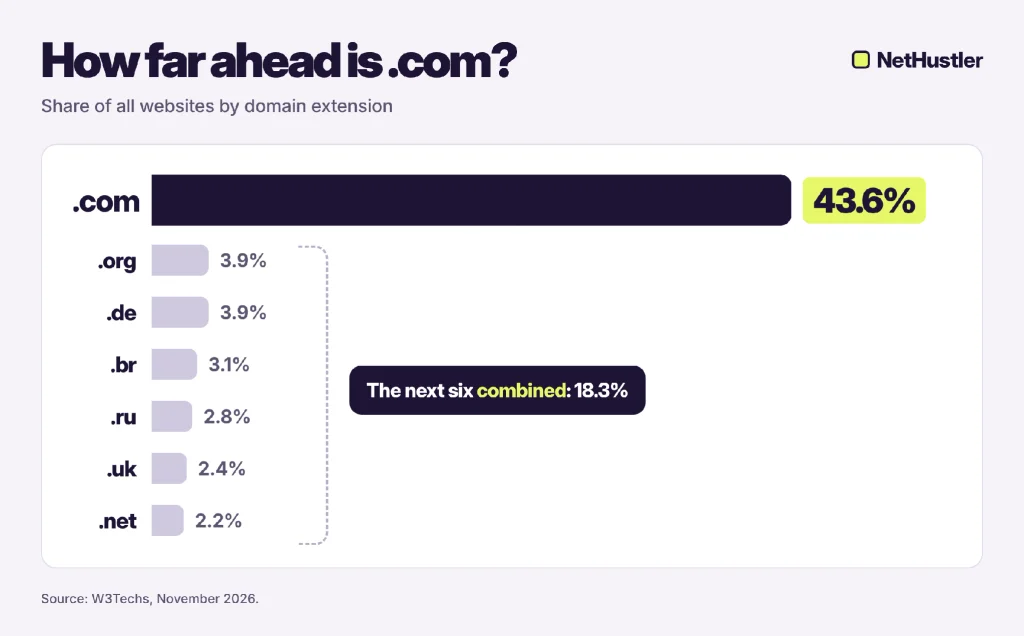
It matters because people type .com on autopilot. If you’re on .net and someone else has the .com, some of your traffic will go to their site.
Google says the extension doesn’t give you a ranking benefit and states it only matters if you’re targeting users in a single country, and even then it’s a low-impact signal.
| Extension | Best for | Watch out for |
| .com | Almost everyone, especially online businesses | Most short, catchy .com names are already taken, so you may need a more creative name |
| .net | Tech projects, or a backup when the .com is taken | Visitors may still type .com |
| .org | Nonprofits, communities, open-source projects | Looks a bit odd on an online store |
| Country domain (.ca, .co.uk, .de) | Businesses serving one country | Harder to expand internationally later |
| Newer extensions (.shop, .studio, .io) | Niche shops, creatives, startups | Less familiar, so some people won’t remember them |
So for .com vs .net, here’s the deal. If the .com belongs to an active business, settling for .net usually isn’t worth it. Some visitors will type .com out of habit, so a different name is safer. For example, if a busy baby store owns lullabet.com and you register lullabet.net, many parents will type lullabet.com and land on that store. A better move is a small tweak like shoplullabet.com, which still gets you a .com and keeps your brand name.
5. Leave room to grow
Your sourdough blog might turn into a baking blog. Your candle shop might start selling soap too. It happens all the time, and a name that’s too narrow can turn that growth into a forced rebrand.
A name like sourdoughsundays.com gets awkward quickly once you post a croissant recipe. The same applies to years (decor2026.com will look dated by 2027) and cities, unless you serve only that city. Lullabet has that kind of flexibility. It suggests letters and bedtime, so wall art, mobiles, and keepsake boxes still fit later.
Pick a name that fits where you might be in three years, not just next week.
6. Brainstorm with a domain name generator (or AI)
Gazing at a blank page is the worst. But don’t worry, there’s still hope. A domain name generator does the boring part for you. You type a word, it mixes it with others, and shows you which combos are free.
Two free ones worth trying are Instant Domain Search and DomainWheel. Both check availability as they suggest names, so you don’t end up with a name that’s already taken.
A brainstorm pretty much goes like this.
- Take the 3 to 5 brand words from tip 1.
- Type them into a generator, set the filters (.com and a short character count), and save anything that makes you smile.
- Ask an AI chatbot for more ideas, with clear rules (example prompt below).
- Collect everything in one list. Aim for 10 to 20 names.
- Cross out anything that breaks tips 2 and 3, so anything too long, hyphenated, numbered, or tricky to spell.
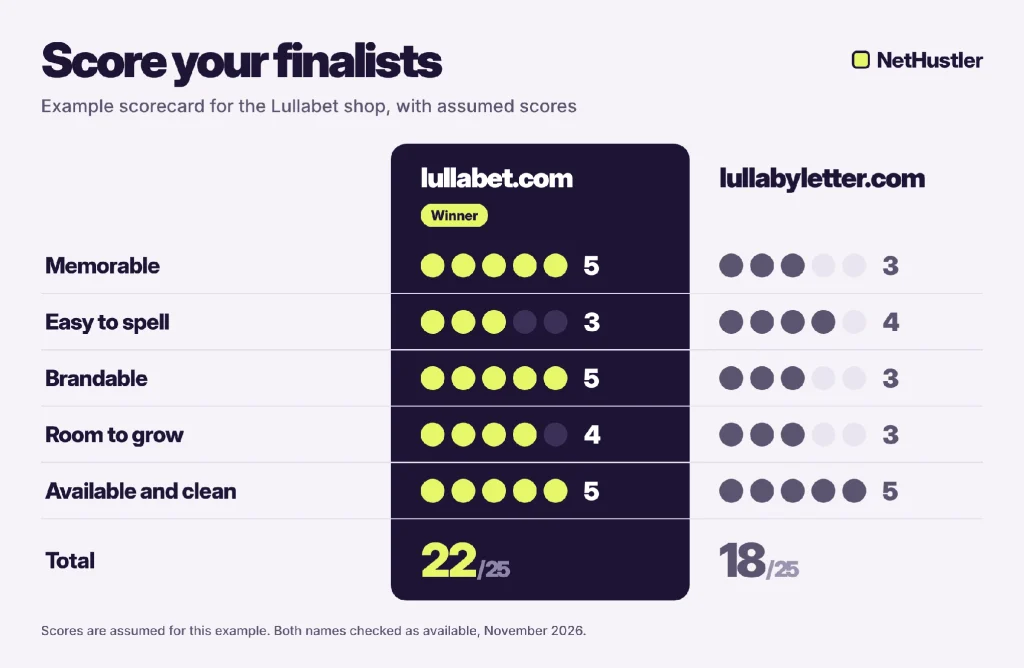
For Lullabet, the generator turned the five brand words into lullabyletter.com, a real result you’ll see below. Playing with the same words by hand, “lullaby” and “alphabet” got mashed into Lullabet. After crossing out names that break tips 2 and 3, lullabet.com and lullabyletter.com were the two finalists.
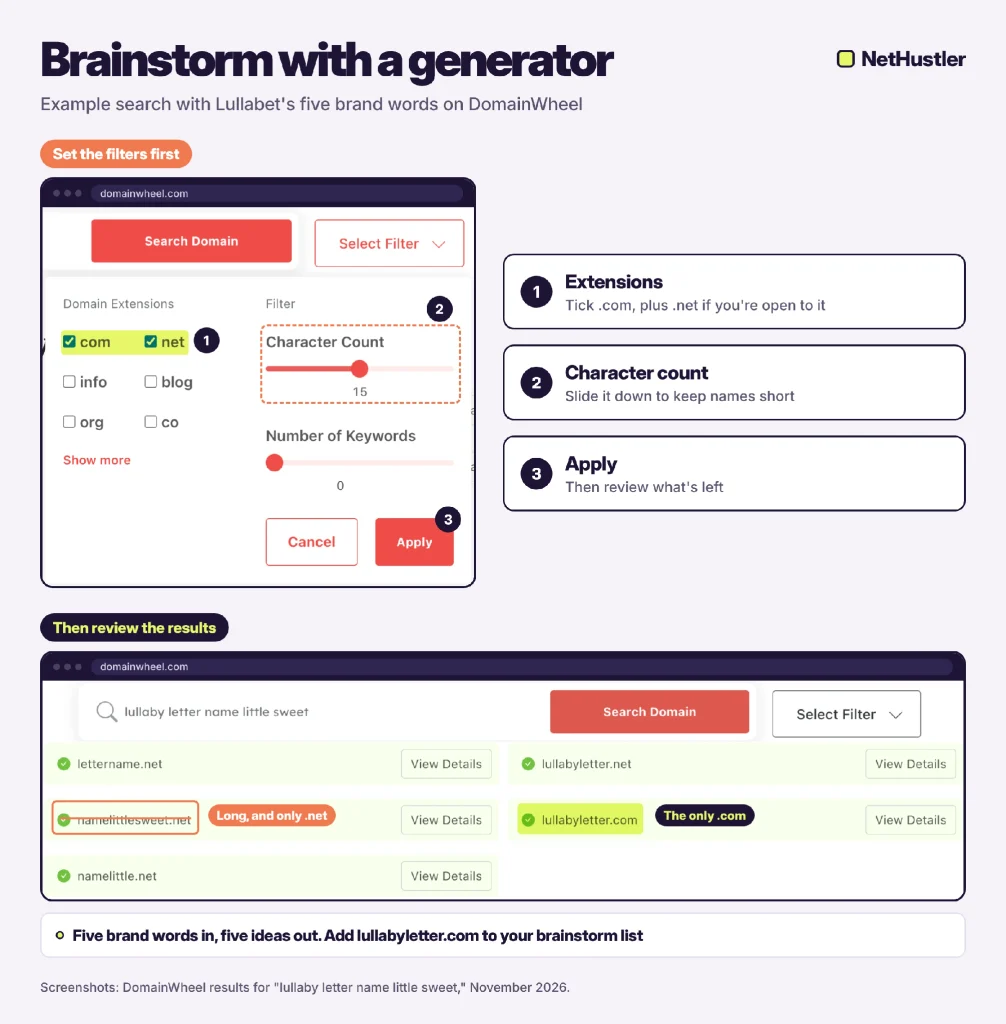
AI chatbots like ChatGPT, Claude, or Gemini are particularly effective for this too, as long as you give them some rules. A prompt like this one will do the job.
“Suggest 20 brandable domain names for a shop that sells handmade name decor for babies’ rooms. Must be max 12 characters, easy to spell, no numbers, no hyphens, .com only. Mix real words and short made-up words.”
Then paste your favorites into a registrar’s search box to see what’s available. Keep in mind a chatbot can’t reliably check trademarks or availability, so everything it suggests still needs the checks below.
What to check before you register a domain name
Once you’ve found a name you love, spend 10 minutes making sure it has no baggage. Run the three checks below in order, and drop a name as soon as one fails. That’s faster than falling for a name you can’t use.
7. Search for trademarks
This one can save you a lot of trouble. If someone owns a trademark on your name in the same industry, they can push you to hand over the domain or rebrand.
In the US, search the US Patent and Trademark Office’s (USPTO) Trademark Search. For other countries, the World Intellectual Property Organization (WIPO) runs the Global Brand Database, which covers trademarks from many national offices.
The quick version takes about 5 minutes.
- Open the search and just type in the name, without the .com. For Lullabet, that’s “lullabet.”
- Look at each result’s status and the goods or services it covers.
- If you’re selling outside the US, you’ll need to search the WIPO database as well.
- Google the name in quotes, like “lullabet” nursery, to catch brands that never registered a trademark.
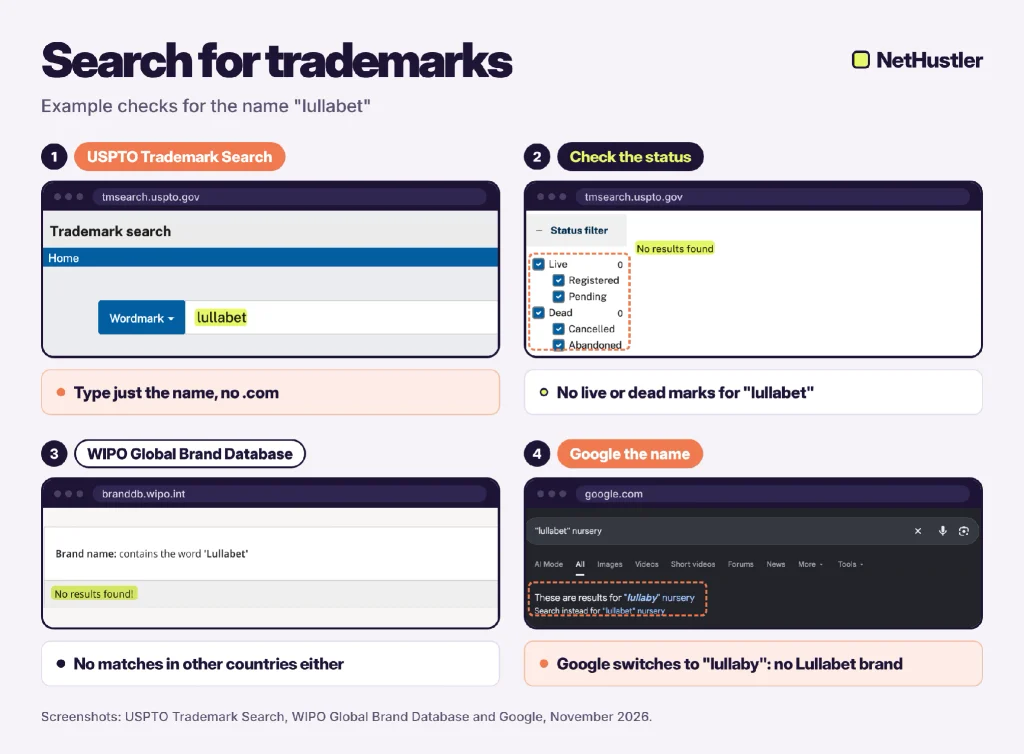
Two things in the results deserve a closer look.
- Status comes first. “Live” means the trademark is active. “Dead” means it’s been abandoned or canceled.
- Goods and services come second. A live mark in a totally different industry is usually less of a worry than one in yours.
If a big brand pops up in that Google search, move on. This isn’t legal advice, so if you’re putting serious money into a brand, a quick talk with a trademark lawyer is worth it.
8. Check the domain’s history
Brand-new names are usually clean. But plenty of “available” domains were owned before, and some were used for spam, adult content, or scams. That history can follow you.
Start with the Wayback Machine. Type in the domain and you’ll see snapshots of what it looked like in past years. Casino pages, pharma ads, or random content in another language are a red flag. A small furniture blog that shut down in 2019 is totally fine.
Then look the domain up in ICANN Lookup, a free tool from the Internet Corporation for Assigned Names and Numbers (ICANN), the nonprofit that coordinates domain names worldwide. Since January 2025, ICANN uses the Registration Data Access Protocol (RDAP) instead of the old WHOIS lookup. It shows when the domain was created, which registrar holds it, and when it expires. Owner details are usually hidden for privacy.
Don’t worry if the two tools seem to disagree. In the example below, the Wayback Machine has snapshots of nethustler.com going back to 2001, but ICANN Lookup says the domain was created in 2018.
Both are right. The Wayback Machine saves a domain’s pages no matter who owned it at the time. ICANN Lookup shows only the current registration. When a domain expires and is registered again, the creation date resets. A gap like that shows the name had an earlier owner, which is when the old snapshots are worth a look.
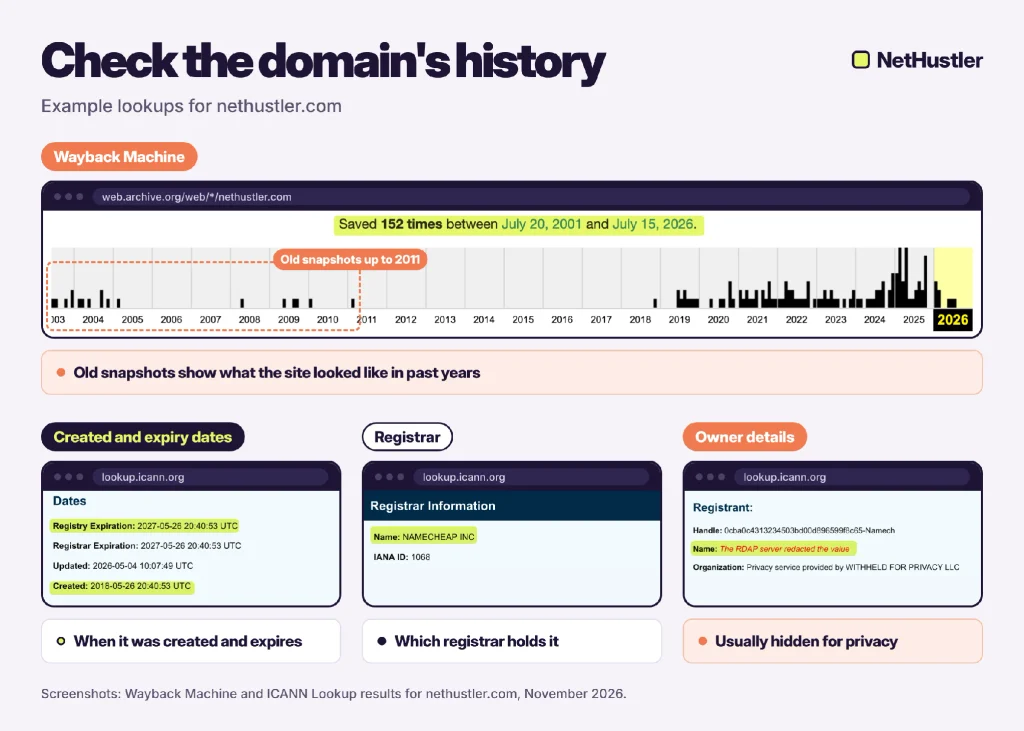
Two more quick checks before we move on.
- Search Google for site:yourdomain.com. If pages show up, old content is still indexed.
- If you have Ahrefs, check the backlinks. Hundreds of spammy links pointing at a “fresh” domain mean you start below zero, and figuring out how to build domain authority gets a lot harder.
9. Grab matching social handles
You want people to find you everywhere under that same name. Before you buy, check out Instagram, TikTok, YouTube, Pinterest, and X.
The quickest way is to search the name on each platform directly. It takes a couple of minutes. A small difference, like adding “shop” or “hq” on social, is fine. A totally different handle just confuses people. This happens even with made-up names. At the time of writing, @lullabet is taken on Instagram by a private personal account, so Lullabet would go with something like @lullabetshop or @lullabet.decor. Those are good matches. @cutebabynames_4u is not.
10. Register it fast (and protect it)
Good names go fast. Verisign, the company that runs .com, processed 13.1 million new .com and .net registrations in the third quarter (Q3) of 2026 alone. That’s roughly 140,000 new names a day.
It’s not common, but it happens. You find a name, sleep on it, and it’s gone by morning.
Once it’s yours, make two quick moves.
- Turn on auto-renew so it doesn’t accidentally expire.
- Buy any other extensions (like the .net or your country domain) only if you’re building a brand that you want to protect. Point them to your main site.
Big brands take that second point seriously. Google, for example, holds google.net and common typos like googel.com and gogole.com. Those typo domains run on Google’s name servers, so they lead back to Google instead of a copycat. Brands do this to prevent scammers from using look-alike names to run phishing sites and trick people into thinking they’re on the real thing.
You don’t need to go that far as a small site. But once your brand starts to grow, grabbing the .net or your country domain is cheap insurance.
Best domain name examples (and why they work)
The best domain names have a lot in common. The table below has a few you probably know, plus what makes each one click.
| Domain | Why it works |
| zillow.com | Made-up word with one obvious spelling |
| airbnb.com | Two simple ideas squeezed into one word |
| mailchimp.com | Two everyday words that make a fun image |
| duolingo.com | “Duo” + “lingo” hints at language learning without spelling it out |
| calendly.com | A short twist on “calendar,” so you can guess what it does |
You won’t find hyphens, numbers, or keyword stuffing in any of them. Each one works as a brand first, and that’s step one in learning how to build a brand online.
How to choose the best domain name from your shortlist
Stuck with three names and no clear favorite… yeah, that’s normal. It’s the trickiest part of domain name selection. Give each name a score from 1 to 5 on these five criteria.
- Memorable enough that someone could recall it tomorrow
- Easy to spell after hearing it once
- Brandable, so it sounds like a business and less like a search query
- Room to grow if you expand later
- Available and clean, meaning a free .com with no trademark or history issues
Highest total wins. If it’s a tie, say both names out loud five times. One will feel better. Sounds weird, but it helps. The scorecard below shows how Lullabet’s two finalists might stack up, using assumed scores as an example.
What to do if the domain name you want is taken
So… uhm… you still didn’t get your domain name yet? Welcome to the club. With so many new names registering every day (remember those 140,000 from tip 10), a lot of the obvious ones have already disappeared.
You can still find a good domain name, though. The table below covers the four main ways to do it.
| Option | Cost | Best when |
| Tweak the name (add “get,” “shop,” “hq,” or your city) | Regular price | You love the core name. Low risk. |
| Use a different extension | Regular price | You serve one country or niche. Some people may still type .com. |
| Buy it from the owner or a marketplace | Whatever the owner asks | The name is worth it to your brand |
| Grab an expired domain | Regular price or a backorder fee | You’ve run the history checks in tip 8. Risky if the history is bad. |
Take Lullabet again and say lullabet.com is taken. The first thing to try is a small tweak like shoplullabet.com or lullabetdecor.com. If neither feels right, check if the owner lists lullabet.com for sale. And if the price is silly, go back to your shortlist and test the runner-up, lullabyletter.com.
If the domain is parked (just a page saying “this domain may be for sale”), the owner probably wants money for it. A marketplace like Sedo handles payment and transfer, so you’re not wiring money to a stranger and relying on luck. Again, this isn’t something you have to do. A slightly different name can work just as well.
Names free up over time. Verisign reported a 75.2% renewal rate for Q2 2026, meaning about one in four expiring names doesn’t get renewed. A name taken today could drop later, and some registrars let you place a backorder on it.
And if you’d rather skip starting from zero, you can buy a website with the domain, content, and traffic already included.
How much does a domain name cost? (And where to register it)
For a standard .com, expect to pay at least $11 a year as of this writing. Most registrars don’t highlight that the first-year price is often a promo. The renewal price is what you’ll pay every year after that.
The floor for a .com just went up. Verisign raised its wholesale .com price from $10.26 to $10.97 on November 1, 2026. ICANN charges registrars a $0.20 fee per domain each year, and most registrars pass it on to you. So a .com costs about $11.17 a year before the registrar adds its own markup. That’s why, at the time of writing, a .com renewal under $11 is hard to find.
| Registrar | .com price (first year/renewal) | Free WHOIS privacy |
| Cloudflare | At cost, about $11.17 / same | Yes |
| Porkbun | $11.81 / same | Yes |
| Namecheap | $12.08 promo (retail $15.98) / $19.98, plus the $0.20 ICANN fee | Yes |
Prices are checked in November 2026, and they change. Cloudflare sells at cost with no markup, so its price follows Verisign’s wholesale price plus ICANN’s fee. Check the registrar’s site before you buy.
Whichever registrar you go with, just make sure it has the following.
- ICANN accreditation
- A renewal price close to the first-year price
- Free WHOIS privacy, so your name and address aren’t public
- Simple DNS (Domain Name System) settings, which connect your domain to your website
- No sneaky fees to transfer your domain out later
Once you’ve picked a registrar, registering your domain takes six steps.
- Search for the exact name, like lullabet.com, and add it to your cart.
- Choose 1 year (or more, if you’re sure) and switch on auto-renew.
- Make sure WHOIS privacy is switched on. At all three registrars mentioned, it’s free.
- Skip add-ons you don’t need yet, like paid email, site builders, or “SEO boosters.”
- Check the renewal price one last time, then pay.
- Open your inbox and confirm your contact email. Registrars send out a verification email, and ignoring it can get the domain suspended.
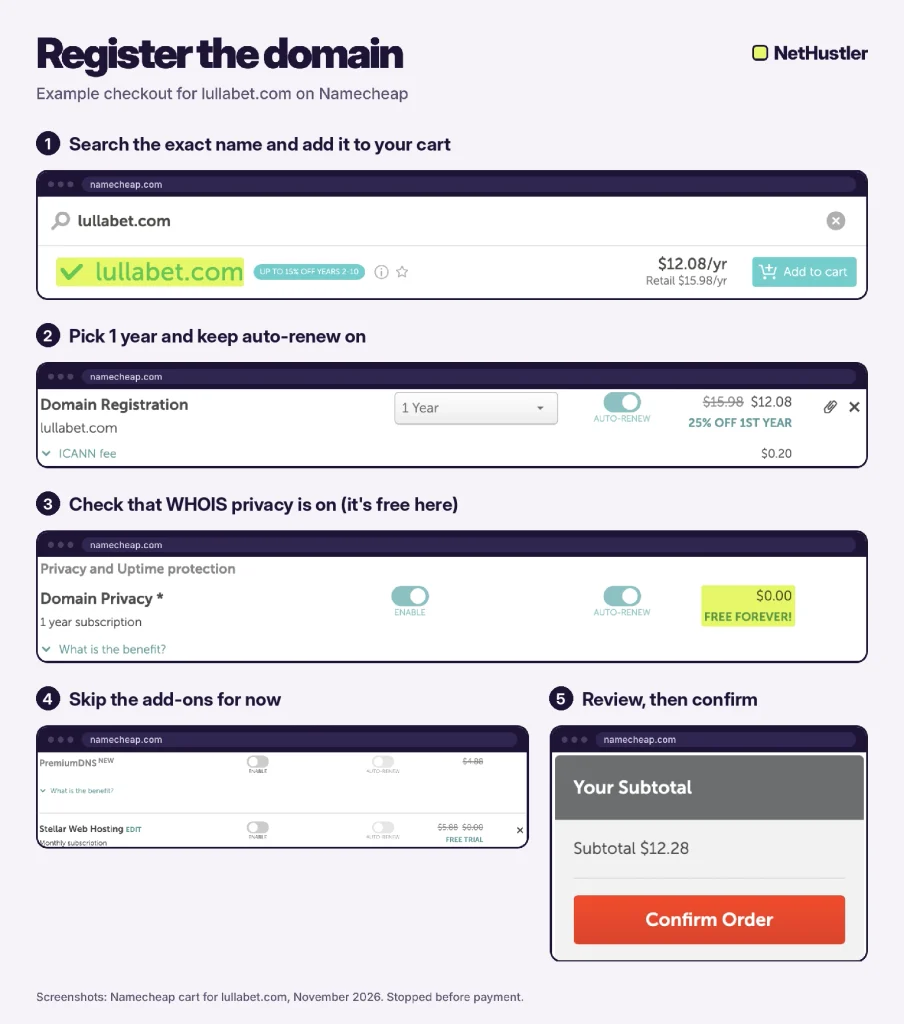
Also, you don’t have to buy hosting from the same company. Keeping your domain separate from your hosting makes switching hosts later way less stressful.
Final thoughts
You don’t need the perfect domain name. A good one that’s short, safe, and yours will do the job.
The whole process fits in six steps.
- Write down 3 to 5 brand words (tip 1).
- Brainstorm 10 to 20 names using a generator or AI (tip 6).
- Cut anything long, hyphenated, or hard to spell (tips 2 and 3).
- Score your top three (shortlist section).
- Run the trademark, history, and social checks (tips 7 to 9).
- Register the winning name with auto-renew and privacy enabled (see tip 10 and the steps above).
Once the name is yours, the fun part starts, which is figuring out how to create a website for it.
Hopefully these tips on choosing a domain name help you out. Your future self, the one who never has to deal with a rebrand, will thank you.
Frequently asked questions (FAQ)
1. How long should a domain name be?
There’s no magic number, but shorter is easier to say, type, and remember. The technical limit is 63 characters before the extension, but nobody wants to type anything close to that. Aim for a name you can type on your phone without checking the spelling.
2. Do I need a website to buy a domain name?
No. You can register a domain today and build the site later. Until then, the registrar usually shows a simple placeholder page. Just keep it renewed so you don’t lose it while you get ready.
3. Can I buy a domain name forever?
No. You register a domain for a set period, usually 1 to 10 years, and then renew it. Turn on auto-renew so it never expires by accident.
4. What happens if my domain expires?
It doesn’t vanish overnight, but it does stop working. Your registrar has to email you reminders before the expiry date, and soon after it lapses, your website and any email on that domain go offline. Many registrars give you a grace period (ICANN allows anywhere from 1 to 45 days) to renew at the normal price. For .com and other generic extensions, the domain then goes into a 30-day redemption period. You can still get it back, but usually with an extra restore fee on top. If nobody restores it, the domain gets released, and anyone can register it, including people who grab expired names to resell. Country domains can follow different rules, so check your registrar’s renewal policy. Or just turn on auto-renew and skip the stress.
5. Is domain privacy worth it?
Yes, especially since many registrars include it for free. It keeps your name, email, and address out of public lookup results, which means less spam and fewer scam emails. If a registrar charges extra for privacy, that’s a good reason to look at another one.
6. Can I change my domain name later?
Yes, but it takes work. You’ll need to move your site, set up 301 redirects from the old domain, and tell Google about the move in Search Console. Traffic can dip for a while, so it’s worth choosing the first time carefully.



Great comprehensive list. I recommend to anyone stick with the .com as much as possible and try to keep it short and snappy so it’s unique and people remember it.
You mentioned buying premium domains and I know you touched on expiring domains but just to add to it, another bit of advice I’ve learnt over the years to get a great domain name is consider looking at domain expiring websites that you can search and from there you can find the domain you want and then you can use a drop catching service to grab that domain. This would A. give you the domain you want and B. there is a good chance that domain is aged and Google is happy with it and C. a much higher chance of it being a premium domain without the additional cost.
Also I’m not sure if you addressed it but it pays to make sure the domain (blog name) you’ve chosen won’t be affected by copyright or trademark otherwise searching for a name might end up being a waste of time.
Hi Andy,
Thanks for reading the article and for the tips, although I wrote a bit about expired domains and avoiding copyright and trademarks in the article, I should probably go more in-depth in the next update.
Cheers,
Stephen
Suppose a person takes a domain name such as learncode.com and subsequently another takes a domain as learncode.in will it give rise to any infringement of the business name of the person owning the .com TLD.
Hi there,
This is a bit tricky, it all depends on the name really if its something generic like HowToLoseWeight.com then I don’t think you will have a problem, it’s important to check if they have trademarked the name because that can give you a few issues though.
In general, I stay away from buying domain names on another extension other than .com simply to avoid this issue, also I really want to stand out from the competition so I always try to create a brand with its own identity in any niche, I would suggest you try to do the same, just to avoid the hassle down the road.
You can also contact a lawyer I guess since I’m not really familiar with this side of the law if you want to be sure. But in reality, it’s just easier to come up with a new name and possibly on .com, heck go for 3 words domain names if everything else fails.
Best of luck,
Stephen
I won’t forget wat I learnt here today